Forum Discussion

When to use Team site (classic experience ) which uses modern UI Vs Team sites / Office 365 groups
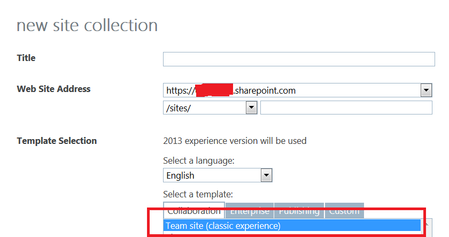

I would use a comm site for my intranet sites because you get a modern top navigation which looks much better than the left quick launch bar. Eventually in near future we'll get the option to change this on all sites thou but for now comm site is the only way.
Classic vs Team (Group site) is only difference is one is connected to a Office 365 group and the other isn't. With that the site has the Group added to default security (Owner, editor) and can be managed with the group. You can tie Teams / Planner etc. to it. And you get the extra webparts because they are group connector webparts which require a group to be used.
As you discovered you can turn classic site into a group connected site (Groupify) so you can go either method, but the modern way is either using Communication sites for stand alone sites, and then Team site(Group site) for collaboration sites / teams etc.
I use Communication sites for all my org facing intranet sites (Home, HR, IT, Finance etc. ) and they are all joined to a Hub (not subsites) where the Home site is the hub, then join the department sites to that hub, rolling up search and content to all the joined sites. This is the "modern" way of doing subsites.

1) Create an Intranet following the "Flat pattern" structure what means each top site in your Intranet is a Site Collection. Following that pattern you could create a Hub Site as your Intranet Root Site (A communication Site, as mentione by Chris is ideal here) and them start creating modern sites (Modern Team Sites or Communication sites) that can join the Hub inheriting navigation and theme from the Hub
2) The reason you see more WebParts in a modern team site is because that kind of site is connected to an Office 365 Group so you have connectors feature there that can use also in your site.
3) You can convert any classic site (be carefull, the same does not happens if you are talking about subsites) into a modern Site and additionally you will be able to add a Team to that modern site created.
 john johnNov 19, 2018Steel Contributor
Hi jcgonzalezmartin thanks for the reply. kindly find my comments:-
jcgonzalezmartin wrote:
My two cents here:
1) Create an Intranet following the "Flat pattern" structure what means each top site in your Intranet is a Site Collection. Following that pattern you could create a Hub Site as your Intranet Root Site (A communication Site, as mentione by Chris is ideal here) and them start creating modern sites (Modern Team Sites or Communication sites) that can join the Hub inheriting navigation and theme from the HubI have never used Hub sites before. but seems it is the way to go for. so now my concern if i can convert or migrate our current classic team site (and all its modern pages & documents) to be a Hub site ? as users have already created many modern pages and documents inside the current classic team site.
jcgonzalezmartin wrote:
3) You can convert any classic site (be carefull, the same does not happens if you are talking about subsites) into a modern Site and additionally you will be able to add a Team to that modern site created.so you mean if i create my departments as classic team sub-sites then i will not be able to convert them to modern team/communication sites that can be linked to a Hub site? so i need to make the decision of whether i should use Hub sites Vs classic team sub-sites in advance ? as i will not be able to covert the classic team site which have classic sub-sites to hub sites which have team/communication sites link to it ?
last question i have, our current classic site contain some classic pages, which we are embedding inside modern pages using the Embed modern web part. we use classic pages as they allow us to add JavaScript code to them. so can we still use/create classic pages in hub sites and modern team/communication sites, and embed these classic pages inside the hub site's modern pages and inside the modern team/communication modern sites?