Forum Discussion

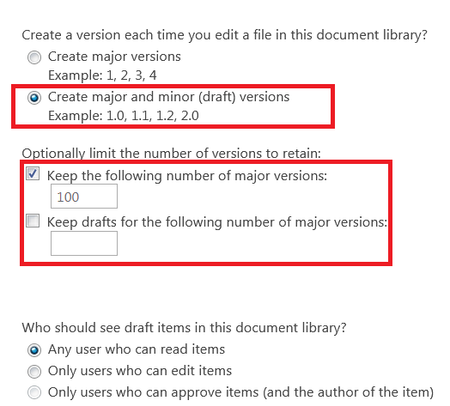
what will happen if we leave the "Keep drafts for the following number of major versions:" unchecked

ChrisWebbTech wrote:
you’re probabaly right. I’ve never seen anyone use those so 🤷♂️
so now i would assume that leaving the "Keep drafts for the following number of major versions" empty, will allow all the major versions (as specified in the first checkbox) to have minor/draft versions

- Carry4IT MegensApr 12, 2022Brass ContributorThat function can now be found here: https://pnp.github.io/powershell/cmdlets/Set-PnPList.html with examples
- Tomas PaulasFeb 03, 2021Brass Contributor
DallasBland ChrisWebbTech I know this is a bit older threat, but still valid. We face the same as DallasBland. However our problem is not really increasing the versions. 500 is enough in case the last one is deleted, but that is not the case. As it is written here, people cannot work until they publish major, more efficient would be delete the 0.500 so you only get latest 500 versions.
Increasing the version is only pushing away the pain and need to publish it anyway when you reach higher number set by powershell.
It really a problem since with AutoSave you reach 500 version in a couple of hours with 5 users collaborating on a document.
Don't you know how to enforce the version being deleted resp. overwritten ? Is there some uservoice for that if not possible now ? Any help appreciated.
Thanks
Tomas
- DallasBlandOct 13, 2019Copper Contributor
Hi ChrisWebbTech and john john
In case you are intersted, I heard back from Microsoft Preimier support. They have confirmed that setting the number of minor versions per major is possible, but not through the SP UI. It has to be done via Powershell.
They sent me the following link with details of how to do it. See example 5.
https://docs.microsoft.com/en-us/powershell/module/sharepoint-pnp/set-pnplist?view=sharepoint-ps
Cheers
Dallas
- DallasBlandOct 02, 2019Copper Contributor
Great! Yes that makes sense, thank you ChrisWebbTech! My question now is (and this is what I was looking for when I came across this thread) how can we set the number of saved minor versions?
How do I change that 511 default? It is not an option in Library Settings > Versioning.
We have a team that is hitting 511 minor versions and it is stopping them from moving forward unless they publish a major. But they only want to publish a major at certain milestones that they have not yet reached. - Oct 01, 2019I re-read the document and I don't know if they changed it or I slept since then but here is how it works in summary.
Major Versions 500 by default. This can be changed by setting the top option.
Minor versions per major. 511 limit per Major Version. (When Major and Minor option is turned on).
If you check the Number of Major versions that have Drafts box, this sets How many Major versions have drafts before it starts removing them. So if you pick 200, then you will only have minor versions for your last 200 Major versions at any given time.
So essentially you are setting
A. How many Major versions in general you want to allow at any given time.
B. How many of those Majors will save their minor versions.
Hope this makes sense. - DallasBlandOct 01, 2019Copper Contributor
This is such a frustrating thread to read. But here's the thing, I agree with what john john is saying - that is how I read it too. That is what the line says - the number of major versions that will have drafts (minor versions) saved - not the number of minor version. But is what ChrisWebbTech is saying actually what Microsoft mean the instructions to say? That it IS actually referring to the number of drafts?
- Feb 04, 2019Well agree to disagree. It says 511 per major not total is default.
- john johnFeb 04, 2019Steel Contributor
ChrisWebbTech wrote:
Yeah it just limits how many per major. If left empty then the 511 default is in play.as i mentioned before "Keep drafts for the following number of major versions:" does not refer to the number of minor versions.. so it is not related to 511!!


