Forum Discussion

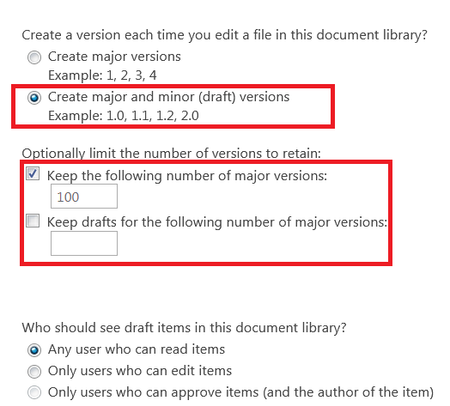
what will happen if we leave the "Keep drafts for the following number of major versions:" unchecked

ChrisWebbTech wrote:
One is for checked in versions. The other is for check out versions as in each edit / save while not being checked in. The only versioning that will happen is when you check a document in. Now while editing / saving drafts.
Thanks for the reply. now i do not think those settings are only used for check-in/check-out, as in our case we do not use check-in/check-out but the documents will have major and minor versions...
also my main question is :- what will happen if we leave the "Keep drafts for the following number of major versions:" unchecked ??

- john johnFeb 03, 2019Steel Contributor
ChrisWebbTech wrote:
If it’s unchecked it will be set to 511 which is the default max.I think the 511 refer to the max number of minor versions we can have for each major version.. while the checkbox "Keep drafts for the following number of major versions:" refer to the max number of major versions that can have minor versions, and does not refer to the max number of minor versions. i think if i set "keep the following number of major versions" to 300 and the "Keep drafts for the following number of major versions:" is empty, then sharepoint will save the latest 300 major versions and all their minor versions. while if i set the "Keep drafts for the following number of major versions:" to 100, then sharepoint will save the latest 300 major versions, but will only keep the minor versions for the latest 100 major version.. i think these check-boxes work in this way, and both check-boxes do not specify the number of minor versions that we can have and it will always have max of 511... i think most of the people got confused about these settings...
- Feb 03, 2019No. Minor versions are draft versions. You get 511 per major if it’s not checked. Otherwise it gets limited to what you specify. Minors get deleted if they are associated with a major that gets deleted after it runs past its limit. So version 1.1 and 1.2 will get deleted after 101 gets published with 100 major limit set and so on.
- john johnFeb 04, 2019Steel Contributor
ChrisWebbTech wrote:
No. Minor versions are draft versions. You get 511 per major if it’s not checked. Otherwise it gets limited to what you specify. Minors get deleted if they are associated with a major that gets deleted after it runs past its limit. So version 1.1 and 1.2 will get deleted after 101 gets published with 100 major limit set and so on.i was confused as you, but if you read the checkbox "Keep drafts for the following number of major versions:" it is referring to the number of major versions that can hold draft/minor versions.. and it is not referring to the number of draft/major version limit.. For example, the first checkbox, is to specify that you want to have max of 300 major, and the second checkbox "Keep drafts for the following number of major versions:" will allow you to specify that you do not want to keep the draft/minor for all the major versions, and that you only need draft/minor to be saved for the latest 100..... so we do not have any control over how many minor versions we can have, as both checkboxes refer to major versions...
- Feb 02, 2019Here is a good article if you haven’t read it that goes over versioning well.
https://support.office.com/en-us/article/how-does-versioning-work-in-a-sharepoint-list-or-library-0f6cd105-974f-44a4-aadb-43ac5bdfd247