Forum Discussion

TonyWilson
Dec 30, 2021Brass Contributor
View in File Explorer - Cookies are only Persistent for a week
About a week later, the folders in file explorer will come up with access denied. Seems like the cookies are gone. Just clicking "View in File Explorer" at any document library will re...
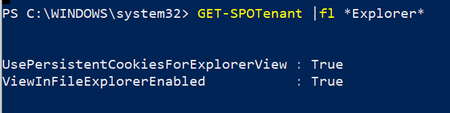

Jan 03, 2022
TonyWilson No worries, it's an interesting question so had to jump on it. Out of curiosity, have your org. configured persistent browser session and/or sign-in frequency using CA? Let me know the outcome of your testing if you have the time for it, thanks.

TonyWilson
Jan 16, 2022Brass Contributor
ChristianJBergstrom It requested to sign-in again after 8-9 days.
I used the file explorer daily for SharePoint and left OneDrive untouched.
On the 8th (or 9th) day, the file explorer connection to SharePoint was not happening (same with OneDrive)
So using it daily is not renewing the connection. I am just doing the same test again to verify if it is 8 or 9 full days (will try to access it an hour before and an hour after the 8th day anniversary.
I used the file explorer daily for SharePoint and left OneDrive untouched.
On the 8th (or 9th) day, the file explorer connection to SharePoint was not happening (same with OneDrive)
So using it daily is not renewing the connection. I am just doing the same test again to verify if it is 8 or 9 full days (will try to access it an hour before and an hour after the 8th day anniversary.
- AllanBlucherFeb 10, 2022Copper Contributor
Is there any solution?
I found out that there are 2 cookies created in IE (not EDGE) the timeout is around 5 days. You cannot view the cookies, while cookies are now stored in a DAT file.
Maybe the cookies can be updated trough a script, every time the user logs on
