Forum Discussion

View in File Explorer - Cookies are only Persistent for a week
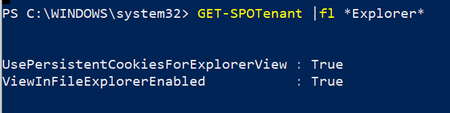

TonyWilson Hi, according to the docs that UsePersistentCookiesForExplorerView the special cookie expires after 30 minutes when the KMSI isn't selected Set-SPOTenant (SharePointOnlinePowerShell) | Microsoft Docs
If selecting the KMSI it seems to be the default value in line with your experience? Session timeouts for Microsoft 365 - Microsoft 365 Enterprise | Microsoft Docs

Thanks ChristianJBergstrom
We have SSO so the KMSI won't come up. The persistent cookie won't expire at windows or user forced signout.
From your link "Session timeouts for Microsoft 365" it feel like the persistent cookie for View In FIle Explorer will expire after "SharePoint Online 5 days of inactivity".
That could be irrelevant of the KMSI, any SSO or other settings. That could be an independant token between SO and Edge. I will record the last time I accessed SO from File Explorer and see if that lasts 5 days.
Maybe that is the design: Access the SO files from File explorer when you click the view in SO, while the connection will remain live depending on your settings, for up to 5 days.
- Jan 03, 2022
TonyWilson No worries, it's an interesting question so had to jump on it. Out of curiosity, have your org. configured persistent browser session and/or sign-in frequency using CA? Let me know the outcome of your testing if you have the time for it, thanks.
- TonyWilsonJan 16, 2022Brass ContributorChristianJBergstrom It requested to sign-in again after 8-9 days.
I used the file explorer daily for SharePoint and left OneDrive untouched.
On the 8th (or 9th) day, the file explorer connection to SharePoint was not happening (same with OneDrive)
So using it daily is not renewing the connection. I am just doing the same test again to verify if it is 8 or 9 full days (will try to access it an hour before and an hour after the 8th day anniversary.- AllanBlucherFeb 10, 2022Copper Contributor
Is there any solution?
I found out that there are 2 cookies created in IE (not EDGE) the timeout is around 5 days. You cannot view the cookies, while cookies are now stored in a DAT file.
Maybe the cookies can be updated trough a script, every time the user logs on
- TonyWilsonJan 03, 2022Brass Contributor
We only have one policy, just forcing MFA to all users, excluding our internal IPs
No other condition is selected in that policyBesides that, we followed the documentation and added with powershell "Set-SPOTenant -UsePersistentCookiesForExplorerView $true" and then configured couple of local machines via the registry to have the view in file explorer dropdown in edge (verified that it was accepted in edge/policy)
[HKEY_LOCAL_MACHINE\SOFTWARE\Policies\Microsoft\Edge\ConfigureViewInFileExplorer]
"1"="{ \"cookies\": [ \"rtFa\", \"FedAuth\" ], \"domain\": \"(TENANT).sharepoint.com\" }"
"2"="{ \"cookies\": [ \"rtFa\", \"FedAuth\" ], \"domain\": \"(TENANT)-my.sharepoint.com\" }"- Jan 04, 2022You’re on AD FS but not 2016? (see table)
https://docs.microsoft.com/en-us/windows-server/identity/ad-fs/operations/ad-fs-single-sign-on-settings
