Forum Discussion

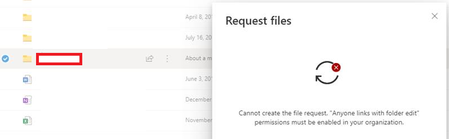
Users are unable to Request files. Error "cannot create the file request. "Anyone links with ...""
- Feb 21, 2020
Hey Folks,
Here is our article on this feature, please let me know if further steps would be helpful here.
Things to keep in mind.
- OneDrive and SharePoint settings can be set individually via the admin center or Power Shell.
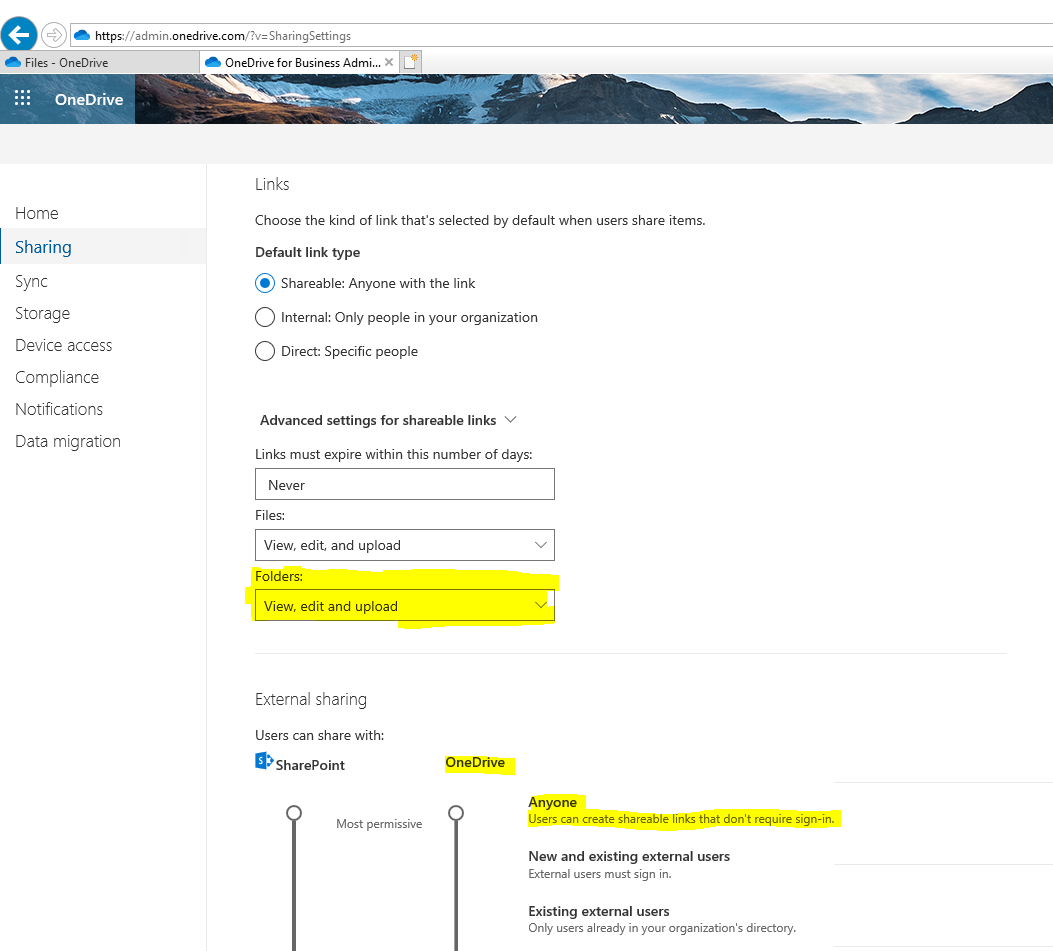
- An administrator must enable Anyone links in OneDrive for file requests to work.
- I'd highly suggest using our new admin center(s) to change Sharing policies or in this particular instance navigate to https://admin.onedrive.com/?v=SharingSettings
- Here you can change the link setting to allow the feature to work properly.
- See screenshot attachment
Let me know if you have questions or concerns.
Regards,
Sam

ok thanks again for your clarifications, i added my questions to your points:-
It will affect all existing sites
so let say i have a SharePoint site which does not allow external sharing, and i move the External sharing slider to Anyone, then this SharePoint site will allow sharing with external users automatically?
Although we are rolling our File requests to SharePoint this is only available on OneDrive sites right now where this setting is rarely changed. That being said, this particular setting is only for Sharing the site , not individually folders and files so this will not affect File requests.
now in our case we always prevent members from sharing the site or file by de-selecting everything inside the Access Requests settings, as follow:-
as sharing the files will cause them to have unique permissions and which will result in having a maintenance problem for large document libraries and lists. so you are saying even if we are preventing members from sharing sites and folder and files by de-selecting the above checkboxes, then members will be able to Request files (i am talking when this feature will be rolled out for SharePoint).. i think MS need to review this,,, as some sites need to be managed and files should not be shared by individual members...

 Microsoft
It will affect all existing sites
so let say i have a SharePoint site which does not allow external sharing, and i move the External sharing slider to Anyone, then this SharePoint site will allow sharing with external users automatically?
No - This will still be dependent on whatever the site setting is by default or if that has been changed. The default site settings can be found here
Now , if you have it enabled and turn off sharing completely (via the slider) then it will indeed force turn off sharing for all sites regardless of individual site settings.
Although we are rolling our File requests to SharePoint this is only available on OneDrive sites right now where this setting is rarely changed. That being said, this particular setting is only for Sharing the site , not individually folders and files so this will not affect File requests.
now in our case we always prevent members from sharing the site or file by de-selecting everything inside the Access Requests settings, as follow:-
as sharing the files will cause them to have unique permissions and which will result in having a maintenance problem for large document libraries and lists. so you are saying even if we are preventing members from sharing sites and folder and files by de-selecting the above checkboxes, then members will be able to Request files (i am talking when this feature will be rolled out for SharePoint).. i think MS need to review this,,, as some sites need to be managed and files should not be shared by individual members...
- As of right now , yes you would still be able to Request Files if this was checked/unchecked. I'm not fully sure I understand why this setting would be expected to affect File Requests as you aren't actually sharing any files to any other users , you are requesting a user to upload files to that folder. The user that receives the request cannot see any other folders/file structure outside of the file request so in that sense I wouldn't consider this a share . Please let me know if i'm missing something here and would be happy to help and consider implementing.
We have also heard a lot of feedback around hiding this feature and are looking into that as an option.
- Sam LarsonFeb 24, 2020
@Sam Larsonthanks for the reply. but if someone request a folder, will this result in having this folder unique permissions?
- Correct, just like when you create a sharing link for a folder this would break inheritance from the parent to allow access.
second question when you say "We have also heard a lot of feedback around hiding this feature and are looking into that as an option. " you are talking about Request files in general or about rolling this for SharePoint?
- Request files feature in general, for both ODB and SharePoint
- john johnFeb 24, 2020Steel Contributor
Sam Larsonthanks for the reply. but if someone request a folder, will this result in having this folder unique permissions?
second question when you say "We have also heard a lot of feedback around hiding this feature and are looking into that as an option. " you are talking about Request files in general or about rolling this for SharePoint?
Thanks