Forum Discussion

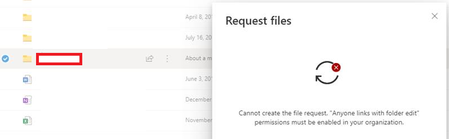
Users are unable to Request files. Error "cannot create the file request. "Anyone links with ...""
- Feb 21, 2020
Hey Folks,
Here is our article on this feature, please let me know if further steps would be helpful here.
Things to keep in mind.
- OneDrive and SharePoint settings can be set individually via the admin center or Power Shell.
- An administrator must enable Anyone links in OneDrive for file requests to work.
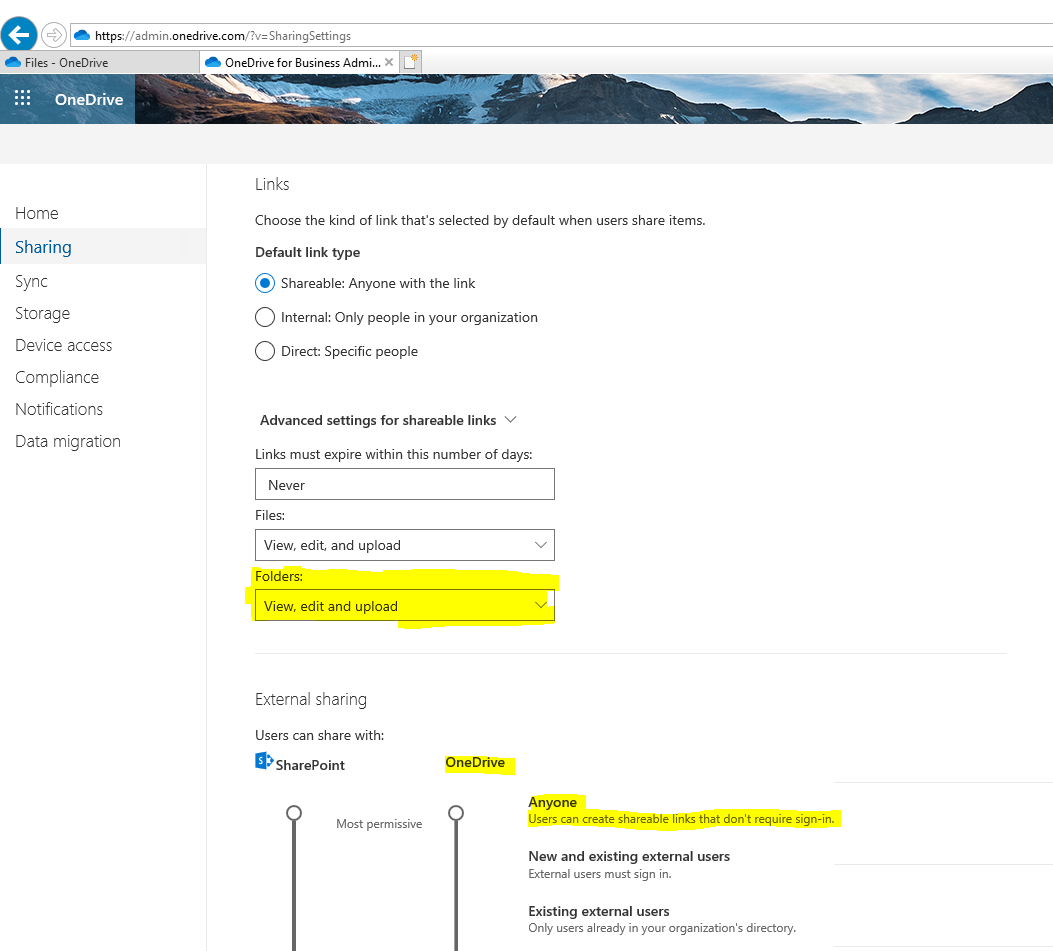
- I'd highly suggest using our new admin center(s) to change Sharing policies or in this particular instance navigate to https://admin.onedrive.com/?v=SharingSettings
- Here you can change the link setting to allow the feature to work properly.
- See screenshot attachment
Let me know if you have questions or concerns.
Regards,
Sam

1) Yes that is my understanding but there are other factors for example, from https://docs.microsoft.com/en-us/sharepoint/external-sharing-overview:
"Even if your organization-level setting allows external sharing, not all new sites allow it by default. The default sharing setting for Office 365 group-connected team sites is "New and existing guests." The default for communication sites and classic sites is "Only people in your organization."
Also, SharePoint sites can be configured individually - https://docs.microsoft.com/en-us/sharepoint/change-external-sharing-site.
2) No, that doesn't have to be changed, its the default type of link when sharing, which users can adjust as needed each time they share a resource, for example to an anyone link, if permitted by those other settings we have been discussing.

 Microsoft
Hey Folks,
Here is our article on this feature, please let me know if further steps would be helpful here.
Things to keep in mind.
- OneDrive and SharePoint settings can be set individually via the admin center or Power Shell.
- An administrator must enable Anyone links in OneDrive for file requests to work.
- I'd highly suggest using our new admin center(s) to change Sharing policies or in this particular instance navigate to https://admin.onedrive.com/?v=SharingSettings
- Here you can change the link setting to allow the feature to work properly.
- See screenshot attachment
Let me know if you have questions or concerns.
Regards,
Sam
 info-overloadOct 14, 2024Tin Contributor
Just a note for anyone that is "Allowing only users in specific security groups to share externally"
You need to manage security groups and make sure the groups have "Can share with" drop down "Anyone".
 CarianneMay 01, 2023Copper Contributor
Sam Larson The powershell commands at https://learn.microsoft.com/en-us/sharepoint/enable-file-requests do not work and give me an error message. The settings in the admin centre are correct, the "request files" link shows up in OneDrive but not in SharePoint.
 john johnFeb 21, 2020Steel Contributor
ok thanks a lot for the reply.i have these 4 questions, if you can please advice on them:-
1. So the setting inside the screen shot you showed, will affect all users' one drive sites?
2. If the answer is Yes, then can i allow this on some one drive sites only?
3. Will this setting (which you showed inside the screen shot) affect our existing SharePoint sites?
4. Inside our share point external sharing we are restricting sharing with external users to a specific group of users (through "Who can share outside your org") as follow:-
so does this affect one drive also? so even if i allow File Request indie One Drive admin enter, the user must be inside the above group?
Thanks
- Sam LarsonFeb 24, 2020
john john Please see answers inline.
1. So the setting inside the screen shot you showed, will affect all users' one drive sites? There were 2 settings I highlighted in my screenshot. 1 setting was for changing the "Advanced settings for Shareable links" - Folder settings to "View,Edit and Upoad". The other being the slider which controls respective SharePoint and One Drive general sharing settings. These can differ from each other however your settings for OneDrive sites cannot be more permissive than the setting for SharePoint sites.
2. If the answer is Yes, then can i allow this on some one drive sites only? You can configure many different sharing settings individually on ODB sites via PowerShell and the Set-SPOSite cmdlet. However , for the one mentioned above "Folder" permissions , you currently cannot control that setting individually on sites , it has to be a global setting for all sites.
3. Will this setting (which you showed inside the screen shot) affect our existing SharePoint sites? The Folder setting , yes. The slider is only for ODB sites.
4. Inside our share point external sharing we are restricting sharing with external users to a specific group of users (through "Who can share outside your org") as follow:so does this affect one drive also? so even if i allow File Request indie One Drive admin enter, the user must be inside the above group? Correct
- john johnFeb 24, 2020Steel Contributor
Sam Larsonok thanks a lot for the detailed reply and valuable information. the confusion we get is that when you access the OneDrive admin center, you will see SharePoint settings also, and when you access SharePoint admin center you will also get settings for OneDrive..
so since in our case some users want to request files inside their OneDrive, so there is no way to avoid the following:-
1. i have to move the External Sharing slider for SharePoint and for onedrive to allow Anyone. i can not keep our SharePoint external setting as "New and Existing users", is this correct?
2. the SharePoint site will also need to get "View,Edit and upload" for their folders? is this correct?
3. now if i move the slider to Anyone for both SharePoint and onedrive will this affect existing SharePoint and one drive sites? or this setting will only allow us to open some SharePoint sites and onedrvie sites for File Request?
4. in our case most of the SharePoint sites grant users contribute permission and we disable the ability to share the site, as follow:-
so will changing the external setting to "Anyone" and the folder setting to "View,Edit and upload" for SharePoint allow those contributor to request files and folders with external users?