Forum Discussion

sumo83
Mar 07, 2024Iron Contributor
User has access to CRITICAL folder not shared with her
Hello experts, I have just found out that I have a user to a critical sharepoint folder folder where she should not have access at all, and I am not sure how that happened. I check via Manage...
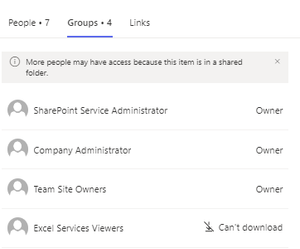

sumo83
Mar 07, 2024Iron Contributor
I have already done it -> see the "When I check via "Check Permission" I see the below" part in my post. Was not very helpful.....

ganeshsanap
Mar 07, 2024MVP
Also, when you check the permissions using Check Permissions option, it shows you the group name from which the access was given to user:
If it is a SharePoint group, you can find that group from "People and Groups" page, generally accessible via link in this format:
https://contoso.sharepoint.com/sites/MySite/_layouts/15/groups.aspx
Please click Mark as Best Response & Like if my post helped you to solve your issue. This will help others to find the correct solution easily. It also closes the item. If the post was useful in other ways, please consider giving it Like.
- sumo83Mar 07, 2024Iron ContributorI do not really understand that “Limited access”… When I click on “Show users”, does it show me users that have access to that particular folder? Because one of those SharePoint group with strange long string contains all users… even users we share some files externally etc… What is that? Doesnt make sense
Can I simply delete those SharePoint Group when checking for a particular folder? If I want only users in the list to have access to it?- sumo83Mar 13, 2024Iron Contributorok.. so I have removed the "limited access" ones, removed the user from "Member" group and the user doesnt see the folder anymore...
I am surprised that the "Permision check" feature was really useless to get some info about how and why a user can access a specific folder... Not sure how the user got access to entire folder if there was only a "limited access" for her.. 😕
- sumo83Mar 07, 2024Iron Contributorgood info.. thank you... However, as you can see in my picture from "When I check via ""Check Permission" I see the below", I can't see any info about how the access was given... unlike in your example, there is no info in mine 😕
Team Member do not have direct access to the folder at all... And yes, the user is part of one ServiceGroup - the one you noticed with Contribute permissions... Now, how do I translate that strange "string" to a group name or any useful info? Or how do I can identify how it was shared?
I have removed the user from Team Member for now.. so will see if that will help