Forum Discussion

 Microsoft
UPDATE: Support for Structured/Managed Navigation enabled on Modern Pages in Classic Team Sites

Hello!
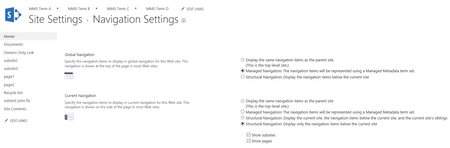
A little late to the party here, but trying to solve for navigation on a new Modern site. In the Classic sites it was very easy and straight-forward to create a horizontal navigation bar. This allowed users to select from over 50 wiki pages in a very organized fashion. However, unless I'm missing something, I can't determine how to create a horizontal navigation bar in the modern pages environment without having to go through the Navigation menu in Site Settings. Is there not an easy "Edit Links" button that someone could use?
 Microsoft
Hi Peter Mcdermott - if you have sufficient permissions you should see an inline edit button that allows you to add, move, and group navigation links. From the pages library there's also an option in the context menu to add to the navigation. Take a look at this article for more details: https://support.office.com/en-us/article/Customize-the-navigation-on-your-SharePoint-site-3cd61ae7-a9ed-4e1e-bf6d-4655f0bf25ca?ui=en-US&rs=en-US&ad=US (let us know if you have other questions). Thanks!
- Peter McdermottAug 24, 2017Iron Contributor
ssquires, thank you for the link. This bullet point addressed my concern:"In SharePoint Online, you can only customize the left-hand menu on a team site at this time unless you are in classic mode."
- ssquiresAug 24, 2017Of course - and yes, missed your note that you were looking to edit horizontal. In modern team we're moving to a left, vertical nav only - but will materialize the classic horizontal nav if you have subsites. You can, of course, continue to edit the toplink nav bar directly, but only through classic settings/page. Thanks.
 guillaume marchalOct 10, 2017Copper Contributor
Hi,
Today the top link bar (global navigation) is gone on modern experience page.
We have a site collection with a lot of classic team sites. Publishing feature activated on this site collection, and a few subsites.
Some sites use classic page, and some sites use modern page -> with this one, the top link bar is gone.
I'm not the only one : https://techcommunity.microsoft.com/t5/SharePoint/Anybody-else-s-top-link-bar-in-Modern-experience-disappear/m-p/114750
There is a regression with the last update ?
Thanks