Forum Discussion

Woody
Sep 25, 2024Brass Contributor
Unknown Tiles in default Documents library (Teams Site)
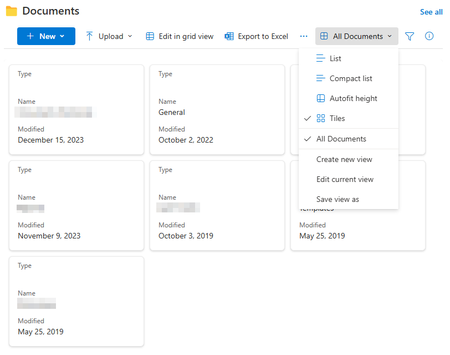
Hi, wondering why instead of the big folders I am presented with this as tiles: I am using the Document library webpart on the home page of a Teams site. Thank you!

Woody
Oct 02, 2024Brass Contributor
Thanks a lot Adeboye_Olaide
Deleted browser's cache, deleted the webpart... nothing.
With a different user, the folders are ok, note the 4 squares symbol:
With my account, the 4 squares symbol is different:
Both accounts have same permissions in the site and the library.
Funny stuff... 😉

support555
Oct 02, 2024Copper Contributor
Woody Adeboye_Olaide Having the same issue starting yesterday. Tried clearing caches adding the new documents library webpart but still the same . However someone on the team is seeing the yellow folder just fine.
- WoodyOct 03, 2024Brass ContributorCorrect, but I cannot find any explanation for this weird behaviour so far... or any fix! 🙂