Forum Discussion

Unable to edit or download embedded spreadsheet
- Nov 01, 2017
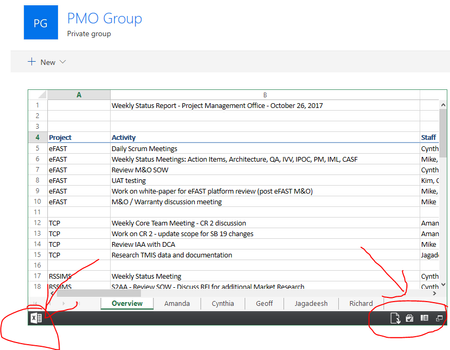
In your modern sharepoint site, you have added the "File viewer" SPFx web part. From this web part, you have pointed it to one of the ~270 supported file formats, Excel.
What was announced at Ignite 2017:
SpoilerBuild richer, more dynamic pages with new web parts. Your pages can include rich, dynamic content from across Office 365, now including Planner and Microsoft Forms. There’s a new file viewer web part that can display previews of over 270 file types. You can embed content from anywhere—including Twitter feeds, YouTube videos and Amazon book recommendations. And you can surface content from more than 100 cloud and on-premises sources using the connector web part.I haven't played with it yet. So that I understand, although the *file viewer* is allowing you to view the excel workbook, you expect the workbook to be *editable*?
Is that the case when you use other formats, like PDF or Word or any of the other supported formats?
Did you try this with any other workbooks - perhaps one with just a single worksheet?
I will test this over the weekend myself.

In your modern sharepoint site, you have added the "File viewer" SPFx web part. From this web part, you have pointed it to one of the ~270 supported file formats, Excel.
What was announced at Ignite 2017:
I haven't played with it yet. So that I understand, although the *file viewer* is allowing you to view the excel workbook, you expect the workbook to be *editable*?
Is that the case when you use other formats, like PDF or Word or any of the other supported formats?
Did you try this with any other workbooks - perhaps one with just a single worksheet?
I will test this over the weekend myself.