Forum Discussion

"Totals" not showing in Modern List View
I have been unable to get "Totals" (sum, average, count, etc) to show on a modern UI list view.
Can anyone confirm that these are not implemented in modern UI?
28 Replies
- Matthew CarterIron Contributor
Brent Ellis is it on SharePoint online, for SharePoint 2019 on premises of October 2019 CU it does NOT exist.
 intersignCopper Contributor
I see Totals as an option, but only for a 7 columns in my list. Most of these columns are not even ones that I would total. I have tried to get other columns to show in my View, but I have not been successful. Has anyone else experienced this and know how to get the columns to show up in the Totals section of the View?
 Scott JoynerCopper Contributor
Brent Ellis The totals are now available for us as well. The drill-down for grouped fields supports clicking on the group, which creates a nice cookie-crumb navigation. The twistie option is still available, but it doesn't work as well as clicking on the group name directly.
 PauThomasCookCopper Contributor
Yippee! It's working again, thanks Microsoft. I was very worried about it.
 SarahLovesSharePointCopper Contributor
Brent Ellis This feature is working for me, at least for today, this is the first time I've seen it work. I hope the feature is permanently baked-in, now! I do not see any news or chatter about it being rolled-out, so I am a bit hesitant to be too excited. Currently, the column totals are showing at the bottom of the modern list view and the totals are in a fixed position, that persists when scrolling.
- Oconnov8Copper Contributor
SarahLovesSharePoint Zoinks! What a break through! I'm withya. Really hope it sticks. This is huge for me and my clients. Thanks for the heads up.
 lisa whiteBrass Contributor
Oconnov8 I noticed it yesterday, too. Like the rest of you, I'm not sure it will "hold" so I'm not announcing it for a while.
- SteveHancockCopper ContributorCome on Microsoft! This initial post was written over 2 years ago - I just released a Portal to a large group and the fact that I cannot provide a count to items in a list is met with derision. Lots of hard work and credibility being undermined as well as your own reputation.
Perhaps a courtesy reply to this thread would be a good start?- Larry CaseyBrass Contributor
What a absolute fool you are Steve. Microsoft does not care, listen, monitor or really give 2 cents what it is you think, want or suggest. The developers and the team leaders do whatever the hell they want and these stupid forums are useless and pointless and have absolutely no influence on anything. Its just aa big waste of time!
- lisa whiteBrass Contributor
Larry Casey We feel your pain, man, but your comment isn't helpful. The only voice we have is to continually remind (read: badger) Microsoft to get things done.
For example, this issue appears in SharePoint User Voice (https://sharepoint.uservoice.com/forums/329214-sites-and-collaboration/suggestions/15931015-column-totals-missing-in-modern-list-views). In fact, it appears multiple times.
The last Microsoft comment was:
"As of March 2019 this feature is available to all users of the list/library webparts on modern publishing pages, and to 50% of First Release users in the full page lists/library app. We are continuing to roll this out to all users, but it’s part of a collection of other features, and we have paused rollout a few times to address requests and changes in those other features. Note this feature is available only in SharePoint Online."
- PauThomasCookCopper ContributorI was happy because we had it, but it was temporal, I hope they put it back soon.
 Deleted
I totally need this functionality and it only works in 'classic view'.
- lisa whiteBrass Contributor
Brent Ellis For a while, they showed up nicely as a "sticky" footer. But now totals are gone. Sigh.
- Oconnov8Copper Contributor
I just saw these yesterday and now gone?
- lisa whiteBrass Contributor
Oconnov8 I saw them last week, too, and now they're gone. This is Microsoft's favorite game - Peek-a-Boo Features.
- André MaasBrass Contributor
It is comming soon to the Modern Lists in SharePoint. If you are in de 'First Release' you have it already.
 Lennart7251Copper Contributor
- André MaasBrass Contributor
Here is how:
You have to be an administrator of the tenant!
Sign in to Office 365 with your work or school account.
Go to the https://docs.microsoft.com/en-us/office365/admin/admin-overview/about-the-admin-center?view=o365-worldwide.
Navigate to Settings > Organization profile.
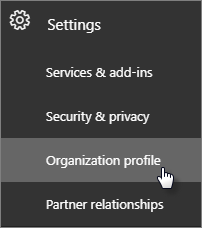
Next to Release preferences, click Edit.
To disable targeted release, choose Standard release, then click Next, and say Yes to the confirmation. Skip to the last step.
To enable targeted release for all users in your organization, choose Targeted release for everyone, then click Next, and say Yes to the confirmation. Skip to the last step.
To enable targeted release for some people in your organization, choose Targeted release for selected users, then click Next, and say Yes to the confirmation.
Choose Add people to add users individually. Search for their names and click + to Add.
When you're done adding users, click Save and then Close.
Not available in my tenant either and shows as "In Development" on the M365 Road Map.


