Forum Discussion

"Totals" not showing in Modern List View

It is comming soon to the Modern Lists in SharePoint. If you are in de 'First Release' you have it already.
 Lennart7251Mar 28, 2019Copper Contributor
- André MaasMar 28, 2019Brass Contributor
Here is how:
You have to be an administrator of the tenant!
Sign in to Office 365 with your work or school account.
Go to the https://docs.microsoft.com/en-us/office365/admin/admin-overview/about-the-admin-center?view=o365-worldwide.
Navigate to Settings > Organization profile.
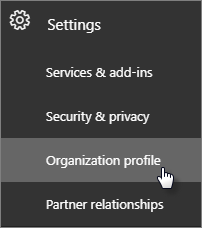
Next to Release preferences, click Edit.
To disable targeted release, choose Standard release, then click Next, and say Yes to the confirmation. Skip to the last step.
To enable targeted release for all users in your organization, choose Targeted release for everyone, then click Next, and say Yes to the confirmation. Skip to the last step.
To enable targeted release for some people in your organization, choose Targeted release for selected users, then click Next, and say Yes to the confirmation.
Choose Add people to add users individually. Search for their names and click + to Add.
When you're done adding users, click Save and then Close.
- Lennart7251Mar 28, 2019Copper ContributorThanks!
- Norman YoungMar 08, 2019MVP
Not available in my tenant either and shows as "In Development" on the M365 Road Map.
