Forum Discussion

SharePoint Sync Not Syncing Causing Document Loss
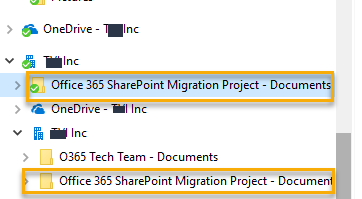

The local sync folders appear to be corrupted.
You should not see the two "roots" without the green check mark: "OneDrive - XXX Inc" and "XXX Inc".
Have you perhaps executed a takeover from the old Groove?
Anyway, you could try a total reset of NGSC, but while you will certainly loose all the locally synced files and you will need to resync from scratch, I am not 100% sure that you will solve the problem.
Maybe it's better to open a ticket...

It is a good thought. However, I know for sure that the sync client is the most recent from when I started using it. I double checked that several times before starting to try to syncing the doc libraries
I have removed it from the sync settings, stopped the sync, and deleted the folder that appeared to be the one that was not syncing.
And it all came back exactly the same way.
They way I "read" it. Only the folders with the green icon are actually syncing.
Crazy. I think opening a ticket is they the way to go.
Is everyone else using sync and not seeing these issues?
It is interesting that the on O365 group is in the section that appears to not be syncing.
Also when I look at the OneDrive for Business settings it says only 2 locations are syncing:
