Forum Discussion

Eric Adler
May 22, 2017Steel Contributor
SharePoint Sync Not Syncing Causing Document Loss
I have now hit a data loss issue with the SharePoint sync. I am wonderin if anyone has seen this or has suggestions/fixes. I have set a SharePoint library to sync. It is the "SharePoint Migration...

Salvatore Biscari
May 22, 2017Silver Contributor
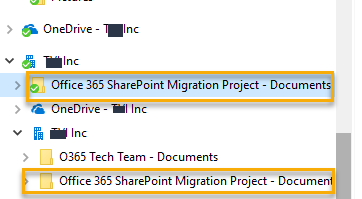
The local sync folders appear to be corrupted.
You should not see the two "roots" without the green check mark: "OneDrive - XXX Inc" and "XXX Inc".
Have you perhaps executed a takeover from the old Groove?
Anyway, you could try a total reset of NGSC, but while you will certainly loose all the locally synced files and you will need to resync from scratch, I am not 100% sure that you will solve the problem.
Maybe it's better to open a ticket...

May 22, 2017
Agree with Salvatore, it seems you have an "old" sync in your PC that it's not the right one and it could come from a previous install of the Sync Client