Forum Discussion

SharePoint Sharing - Allow Users with Read Permission Level to Share?
- Mar 07, 2024
KatherineS-Q I don't think you will find any Microsoft official documentation explaining similarities/differences between "Copy link" and "Share" features.
If you think this is a bug, I will suggest you to raise a support ticket with Microsoft directly and report this behavior: Get M365 Support - Online Support
Please click Mark as Best Response & Like if my post helped you to solve your issue. This will help others to find the correct solution easily. It also closes the item. If the post was useful in other ways, please consider giving it Like.

Thank you for your response!
In this scenario, the user is sharing content (e.g., file, page, etc.) with someone that has existing access, so they are not sharing with someone that does not already have access.
It seems like allowing the end users of your employee intranet to share content with each other using the Share option should be allowed, especially if they are using the "Users with existing access" sharing link and "View only."
Are they expected to select "Copy link" and then chat/email the link to the person(s) they want to share with?

Yes, if other users already have access to the files, use "Copy link" option:
Related read: SharePoint: Copy direct link of document
Please click Mark as Best Response & Like if my post helped you to solve your issue. This will help others to find the correct solution easily. It also closes the item. If the post was useful in other ways, please consider giving it Like.
- KatherineS-QMar 07, 2024Brass Contributor
When you select "Copy link," the link that generates is "People with existing access."
In my tenant, when a user selects Share, the default sharing link is set to "People with existing access" and "Can view."
When you look at the links, they are different.
- Copy Link: https://ABC.sharepoint.com/:u:/r/sites/SITENAME/SitePages/Testing-1.aspx?csf=1&web=1&e=xnaRb0
- Share Link: https://ABC.sharepoint.com/:u:/r/sites/SITENAME/SitePages/Testing-1.aspx?csf=1&web=1&e=zZCGX8
Due to the default sharing link being "People with existing access," I assumed the user could use the Share option, just like Copy link. To me, this seems to be a bug. I can't find any documentation from Microsoft that clearly outlines the limitations of the Share option.
- ganeshsanapMar 07, 2024MVP
KatherineS-Q I don't think you will find any Microsoft official documentation explaining similarities/differences between "Copy link" and "Share" features.
If you think this is a bug, I will suggest you to raise a support ticket with Microsoft directly and report this behavior: Get M365 Support - Online Support
Please click Mark as Best Response & Like if my post helped you to solve your issue. This will help others to find the correct solution easily. It also closes the item. If the post was useful in other ways, please consider giving it Like.
- KatherineS-QMar 08, 2024Brass Contributor
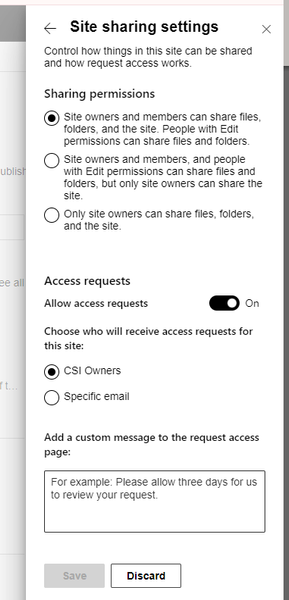
ganeshsanap After thinking more about this scenario, I believe the Share option is working as designed, but my end users have a different idea of how the Share option should be used. They look at Share as a means of quickly sharing with a specific user. However, when you select Share, it's to give some kind of access. Since they do not own the content, they do not have the necessary permissions to grant access.
This is going to require building awareness and knowledge with my end users.
Thank you so much for your help!