Forum Discussion

SharePoint OneDrive file sync issues when users open the same file

Please note that if the documents are synced with onedrive you wont get any notification that another user is editing since this is happening on a local file until the file is synced.
Regarding the sync issues make sure you are both running the new onedrive sync. It may sound like one of you are using the old sync. Check your processes on task manager. You should be running OneDrive.exe and not GROOVE.exe

We had a similar issue. Updating to the most recent version of OneDrive sync helped since locally synched files now open the server copy instead of a local copy and then, synching changes.
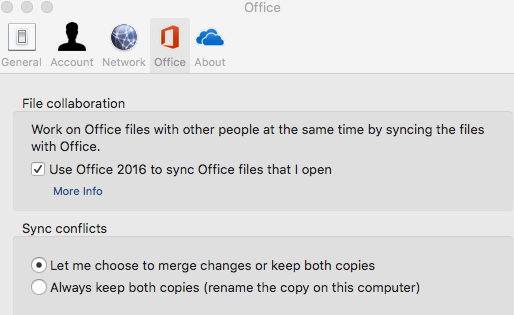
Also, in the User's OneDrive settings, make sure that the following are the selected options in the Office tab.
You'll see two options regarding how conflicts are handled, you want to select the option Let me choose to merge changes or keep both copies.
Note: This screenshot is from my Mac but the PC client has similar options.
 Angela McGhinJul 12, 2018Brass Contributor
Thank you.
I believe we are all using the latest version of sync, and have checked the box to 'Let us choose to merge...' where possible, however on a couple of PC's this option appears greyed out!
We are currently looking at upgrading all office software on all machines, so hopefully that will help to at least reduce the number of issues.
- LisaJo48Jul 12, 2018Iron Contributor
This is what worked for me. After syncing the library and finding the lock symbol on all the files in the library displayed in my File Explorer, this is what I did:
- Remove all required column status from all fields. Be sure to include the default Title field. You might have to drill into the Document and/or Item Content Types to get to it. (I have found that it seems to be set as a required field by default in the standard Document content type)
- Enable version control inclusive of drafts, be sure it is set for 'anyone who can read'. Save. Then return and disable it.
- Enable Content Approval and save. Then return and disable it.
The key one, for whatever reason, was #3. When I did that, a message box popped up on my monitor saying something like 'you can now edit your files in OneDrive'. When I checked my File Explorer, the locks were gone. I verified today that other users who are syncing this library to their File Explorer are also now able to edit the files (the lock was gone for them, too).
Below is my original post.... LOL.... I was pretty excited to see that this worked. I hope it does for you, too.
Out of desperation, I enabled Content Approval and then disabled Content Approval and.....
Low and behold I got a pop up from ODB saying 'You can now edit your files'. I opened my File Explorer....yes...wait for it....and the LOCK WAS GONE! OMG, I spent hours on this to find that it was one check box for a feature I'd never enabled for the library. Why it was affecting its performance, I haven't a clue, but it worked. WHEW!