Forum Discussion

ppypayap
Dec 04, 2022Copper Contributor
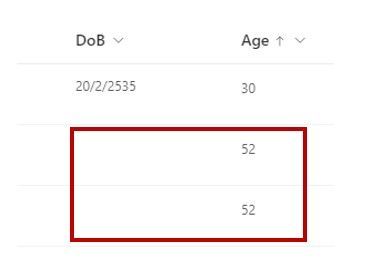
SharePoint Lists - Calculate age from only filled date column
Hi, I would like to get automatic age column calculated by today date and date of birth column. I have tried using this method https://techcommunity.microsoft.com/t5/sharepoint/lists-formulas-for...

RobElliott
Dec 05, 2022Silver Contributor
ppypayap you can add a style section and a visibility attribute to make the number in the age column hidden if the date of birth column doesn't have an entry, for example:
{
  "$schema": "https://developer.microsoft.com/json-schemas/sp/column-formatting.schema.json",
  "elmType": "div",
  "txtContent": "=floor((Number(@now)-Number([$Birthday]))/(1000*60*60*24*12)/365*12)",
  "style": {
    "background-color": "#008082",
    "padding-left": "4px",
    "color": "white",
    "visibility": "=if(Number[$Birthday]==0,'hidden','visible')"
  }
}
Rob
Los Gallardos
Intranet, SharePoint and Power Platform Manager (and classic 1967 Morris Traveller driver)
 jonna1973Jan 23, 2023Tin Contributor
Hi RobElliott is it possible to add to this JSON that if number X is displayed, colour of number is XX, if number Y is displayed, colour of number is YY, if number Z is displayed, colour of number is ZZ
Any help would be appreciated
- RobElliottJan 23, 2023Silver Contributor
jonna1973 yes you can set the colour depending on the value, for example:
{
  "$schema": "https://developer.microsoft.com/json-schemas/sp/column-formatting.schema.json",
  "elmType": "div",
  "txtContent": "@currentField",
  "style": {
    "color": "=if(@currentField <= 8, 'red', (if(@currentField >= 9 && @currentField <= 16,'orange', 'green'))",
    "padding-left": "10px"
  }
}
Rob
Los Gallardos
Intranet, SharePoint and Power Platform Manager (and classic 1967 Morris Traveller driver)- jonna1973Jan 23, 2023Tin ContributorThank you for the quick reply and info. Is it possible to combine both? the date of birth JSON and the one just provided. Very much appreciated 🙂