Forum Discussion

SharePoint list looks like is opened in Microsoft List even if is fact opened in SharePoint.
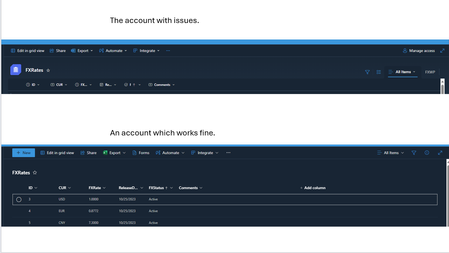


Hello All,
No feedback from the Microsoft support team so far, other than what I have already shared.
Today I decided to "update" my search for people with this issue and I have found in one of the forums the following link:
https://intranetfromthetrenches.substack.com/p/switching-to-microsoft-lists-a-goodbye
Now we are 100% sure that all this mess is because they applied this new "feature" without testing it.
Apologies in advance to the people that I have dragged in this thread, please also add a comment if you have the time so that we can draw attention.
pmarcial (thank you for the link with the "goodbye")
Unfortunately I cannot add here people from the following links, if someone can do that please let me know or add them in a comment:
https://answers.microsoft.com/en-us/msoffice/forum/all/sharepoint-list-view-ui-is-changed-to-microsoft/3e45ff3b-e078-4599-920d-25e2f36d584f?page=1
https://answers.microsoft.com/en-us/msoffice/forum/all/sharepoint-list-ui-change/57cce3bd-d99b-4ff3-a616-a4d1c7e1c72d
https://answers.microsoft.com/en-us/msoffice/forum/all/change-in-ms-lists-gui-when-viewing-though/c651665f-c3cf-4cf0-8311-1237774e4157
https://answers.microsoft.com/en-us/msoffice/forum/all/how-to-switch-between-microsoft-list-experience/c3e5be89-4ffc-43c3-9c62-817b44fa58a4
I will tell them to comment on this thread by themselves in the mean time.
 TryautomationAug 15, 2024Copper Contributor
hello
I also avoided this by customizing the list, but when I checked today, it was applied there as well.Hard to see!
- Johnny0000Jun 26, 2024Brass Contributor
Hello TK_Lim ,
Thank you for your input, I have tested on a new list and this is the first fix that actually works.
But along with this fix other issues arise,
1) You need to learn a new program in order to customize your form.(Power App).
2) I have tried in the past to create custom forms in SharePoint lists but Power App when used for this has a lot of bugs and limitations, a few examples, you can not use Site Columns in your forms, the size of the form has only a few predefined sizes and the form will no longer adjust its size depending on the browser window as the SharePoint form does, and many others that I forgot, but I can say for sure that is annoying to use power app for this.
3) You will lose most of the settings and customization that you have made in your SharePoint form.
4) And possibly the most important, given that all of this is because of the "new features" that Microsoft added is just a matter of time until they will integrate also the lists with Power App forms, and then all your work that you have done to create from scratch a new form in Power App will be for nothing because you will be back to square one with the issue.
Dear All, if you want to integrate as a fix what TK_Lim suggested I would advise to first try to do this on a new list or to copy your list and try to make changes on that and make some tests.
Unfortunately I cannot apply this fix, but is possible that others will find it useful.
 TK_LimJun 26, 2024Copper Contributor
Someone shared this method to switch the UI from MS list to SP list. It solved my problem for now.
1. Go to the list.
2. Go to Integrate-->Power Apps-->Customize forms.
3. Publish the customize form.
4. Refresh the list.
Also make sure the Form Setting under List Setting is set to "use a custom form created in PowerApps".
 GrizzlyBunnyJun 26, 2024Brass ContributorWe have raised a few tickets with MS. They keep saying this is the new feature and we can't roll back. They share articles to MS community posts on the advantages of the new list without acknowledging how buggy and premature it is and close the ticket.
