Forum Discussion

Sharepoint List - Single line of text starts with +49
- Oct 13, 2023
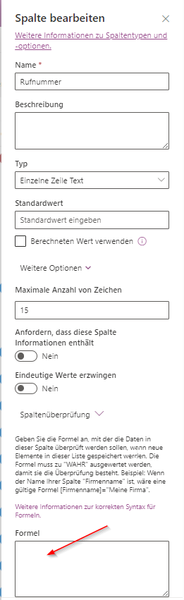
Its working now, I inserted the formula into the web page UI of the list and selected the column, as shown in the screenshot
=WENN(LINKS(Rufnummer;3)="+49";WAHR;FALSCH)Formula is working correctly:


MichaelW It is working fine for me with English language SharePoint site.
Can you try using this once:
=WENN(LINKS([Rufnummer];3)="+49";TRUE;FALSE)
Make sure you are using correct name of your column in place of Rufnummer in above formula.
Please click Mark as Best Response & Like if my post helped you to solve your issue. This will help others to find the correct solution easily. It also closes the item. If the post was useful in other ways, please consider giving it Like.
- MichaelWOct 12, 2023Brass Contributor
- MichaelWOct 13, 2023Brass Contributor
Its working now, I inserted the formula into the web page UI of the list and selected the column, as shown in the screenshot
=WENN(LINKS(Rufnummer;3)="+49";WAHR;FALSCH)Formula is working correctly:
- ganeshsanapOct 13, 2023MVP
Great, glad it worked for you. I was going to suggest you the same to use WAHR and FALSCH instead of TRUE and FALSE based on this documentation:
Documentation: WENN (Funktion)
Formula:
=WENN(LINKS([Rufnummer];3)="+49";WAHR;FALSCH)Please click Mark as Best Response & Like if my post helped you to solve your issue. This will help others to find the correct solution easily. It also closes the item. If the post was useful in other ways, please consider giving it Like.