Forum Discussion

Caterpillar_94
Feb 10, 2023Copper Contributor
Sharepoint conditional column formula not working
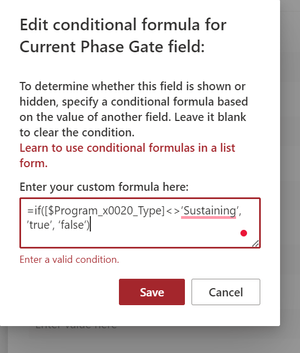
I have a column titled 'Current Phase Gate' I want the visibility of this column to be based on a prior drop-down selection from a column titled 'Program Type' with an internal column name as Pr...

RobElliott
Feb 13, 2023Silver Contributor
It looks like your single quotes are wrong
Your syntax: =if([$Program Type]<>’Sustaining’, ’true’, ‘false’) which gives an error.
My syntax: =if([$ProgramType] != 'Sustaining', 'true', 'false') which works.
Your syntax: =if([$Program Type]<>’Sustaining’, ’true’, ‘false’) which gives an error.
My syntax: =if([$ProgramType] != 'Sustaining', 'true', 'false') which works.

Caterpillar_94
Feb 16, 2023Copper Contributor
Hi Rob, I think I found the issue and I should've mentioned this in the OP. The column I'm trying to perform this on is a Person field and I don't think SharePoint likes that.