Forum Discussion

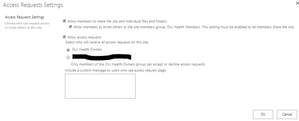
SharePoint Access Requests Settings

 Microsoft
Hi all,
I can shed a little light here! If the subsite is fully inheriting permissions from the parent site, then the access request is sent to the parent site. If the subsite does have unique permissions, it should go to the owners group of that subsite. Hope that helps!
Stephen Rice
OneDrive Program Manager II

Thanks Stephen,
That's likely the issue for Gitte in terms of the access requests going to a particular group.
Can you shed any light on the Admin group though? Seems to be an issue with sites connected to a Hub. The Access request settings seem to use the word Admins rather than Owners.
Thanks,
Andy.
- Dorje-McKinnonDec 10, 2021Iron Contributor
One thing I've found out in going through this, is that :
- IF the team owner approves an "Access request" for myDocument.docx to Bob. When you view the information panel for the myDocument.docx file , then click "Manage access", you'll see Bob's name under the "Direct Access" heading. And you can remove it from hear without having to go back into the AccessRequests list (/sites/sitename/Access%20Requests/pendingreq.aspx) to remove Bob's access.
Given that
- Users will send links rather than using the share button, no matter how much training we give them.
AND - Team Owners get the "Access request" email, when the recipient of the link clicks on it and get's the "request access" form and submits it
AND - It is only one click for the team owner to approve access, rather than multiple clicks to Share the file/folder to the person or add them to the TEAM
AND - It is easy to revoke access, via the Information panel for the file or folder, or via the AccessRequests list (/sites/sitename/Access%20Requests/pendingreq.aspx) [Microsoft this could be easier to get to]
I've decided that for my tenant I'm going to leave this hang over from earlier versions of SharePoint in place. Because it is easy for team members and team owners. Even though I don't like the fact it is a bit messy from an admin perspective 🙂
I hope this is useful to others.
- Dorje-McKinnonDec 09, 2021Iron Contributor
Hi Dean_Gross and StephenRice -
Well 2 years on from my last post on this thread, and now that I've got 90% of our users into TEAMS I've had to revisit "Access Request Settings" because
- team members copy file links and send them to non-team members
- Who then get "Request Access boxes", that they fill in and click send
- team owners get the X person has requested access to Y document, emails then go and Approve or the request.
This works, but because it is outside the normal TEAMS security model (and these permissions aren't easily visible in teams) is a big pain point when there are security related issues.
So I was looking for a way to Untick the "Allow Access Requests > Access request settings" programmatically with powershell.
Ideally I'd like all new SharePoint sites to have this unticked, but I can't find how to set this.
What I did find was Salaudeen Rajack's code to do this for a single site or for all sites in the Tenant.
https://www.sharepointdiary.com/2020/03/sharepoint-online-disable-access-requests-for-all-sites-using-powershell.htmlNote this June 12th 2021 post is the one that works for me.
I'm posting this so that anyone who finds this thread - can have some peace and avoid having to fix up broken security inheritance. 🙂
- team members copy file links and send them to non-team members
- Dean_GrossSep 25, 2019Silver ContributorWhen a SPO site is Group enabled, the accounts that are assigned to the Owner role within the associated Office/AAD group become SCAs due to the fact that the Office group is assigned to the SCA role in SPO. While the entire group is assigned to the SCA role, their is some code running in the background that prevents the Members of the group from performing tasks that should only be done by the SCA.
Associating a site to a Hub does not affect security. This can become a problem if the Hub Site owner does not have access to a linked site. This needs to be manually coordinated.
in this approach Group Owners are also Site Owner as well as SCAs, which demonstrates the need to have a good Group Management strategy. Groups can easily get orphaned when a single owner leaves and the only way to prevent this is to have some custom scripts running.
Don't create separate DLs, that will just make things more confusing 🙂 - LisaJo48Sep 25, 2019Iron Contributor
Thanks Dean_Gross
I have checked that, however, I'm under the impression that Site Collection Admins and the "Admins" designated in the Access Request settings when the site is teamified, are different since, when the site is not teamified, the reference is to Owners, not Admins.
So, are you saying that the teamified site's reference to 'Admins' in the Access Request Settings is, actually, the Site Collection Admins? If so, this becomes a problem, I believe, when the site is associated with a Hub because then, the Site Collection Admins that receive the requests for access are those of the hub site instead of the site itself. In the delegated world of one-site-per-site-collection that we live in now, the site owners need to be getting the requests, not the Collection Admins, and to set up a separate DL for each site, as a workaround, does not promote self-management or delegation or get IT out of the middle of it. For us anyway, it creates the very bottleneck we're trying to eliminated by using Modern sites, hubs, and group functionality.
Would you please clarify this for me? Thanks.
- Dean_GrossSep 23, 2019Silver Contributoryou need to open the SharePoint site that is associated with your Team to see these settings.
Open the SPO Site, click the Settings Gear for the site (between the Bell and the ?) then choose Site Permissions this will take you to the SharePoint permission page that provides sharepoint specific capabilities. - LisaJo48Sep 23, 2019Iron ContributorStephenRice,
This may be a disconnect for me: when I look at the groups (which is via TEAMS), I don't see a 'Group administrators' role as you mentioned. All I see are the TEAM's Owners and Members. Where can I find the additional group's administrators listed? - LisaJo48Sep 20, 2019Iron Contributor
StephenRiceThank you for a quick response.
I have found that, with sites connected to a Hub, the 'admin' is the site collection admins for the hub site, which is completely wrong if the idea is to delegate that kind of task to the individual site's owners. And, for those not connected to a hub, collection admin can be the same, different or include other users who are not members of TEAMS and the associated website so they don't want, nor should they get the access request notifications that can't process.
Unfortunately, manually creating distribution list for every TEAM that users create isn't a scalable workaround. Any other ideas? To me, it just needs to offer a choice rather than be hard-coded to the one. Allow us to choose Admins or the site's Owners and it would solve all of this, don't you think?
By the way, what is the purpose of the site collection administrator in contrast to the site Owners now that there is only one site per site collection? Maybe that's where my disconnect is: I'm not understanding the role's 'raison d'etre' in the Modern configuration and architecture.
Thanks again for a quick answer. Really appreciate that.
- StephenRiceSep 20, 2019
Hi LisaJo48,
For Group-connected sites, the hard-coded option should send the access requests to all the Group administrators (which may or may not be the same as the site administrators or site owners). If the default isn't working, the best option unfortunately is to create a DL of the site owners & enter that into the e-mail address field. Thanks!
Stephen Rice
SeniorProgram Manager, ONeDrive
- LisaJo48Sep 20, 2019Iron Contributor
StephenRice I have TEAMS-enabled modern team sites and I would like the Owners group to receive the request for access emails. It appears to be hard-coded, if you will, to the "Admins" which I am assuming are the site collection admins. This role is, virtually, obsolete in modern, flat architecture unless there's something I'm overlooking. How do I get my modern sites to reference the Owners perm group instead of the collection admins?
- Gitte BergmanJan 11, 2019Copper ContributorSorry to bother you again, but in my test case, your logic does not work.
If I understand your logic, below statements should be true:
* If permission inheritance in subsite = TRUE; then requests go to PARENT owners
* Else if permission inheritance in subsite = FALSE; then requests go to SUBSITE owners
For my case; the logic is the following:
* If Permission inheritance in subsite = TRUE; then requests go to PARENT owners
* If Permission inheritance in subsite = FALSE; then requests go to PARENT owners
The only way to have request NOT go to parent owners is to enter an email address in the second option in the settings.
It would be great if the first option had a drop-down menu where all available groups that have full access on the sub-site and site collection was listed. - StephenRiceJan 10, 2019
Hi all,
Yes, the mails should be following the logic I specified above, not the string (which as has been pointed out, doesn't actually make sense :) ). There is an issue with the logic of how we build that string which is displaying the wrong string for sub sites on group sites. We've got this recorded and will look at fixing this in the future. Thanks!
Stephen Rice
OneDrive Program Manager II
- Gitte BergmanJan 10, 2019Copper Contributor
StephenRice and Andrew Silcock,
Thank you both for your considerations. The subsites were created with unique permissions from start. I should mention that I named them (the subsites) the abbreviations of the respective departments, for instance "SEC" for "South European Cluster". All user groups therefore begin with the department abbreviation (such as SEC Owners, SEC Members and SEC Visitors) since I like to keep things short and sweet. After creation I changed the site titles manually to the full department names (in my example; "South European Cluster"). Now for the curios part: The user group referenced in the access request settings is "South European Cluster Admins". There has never been a group with that name. Does this information reveal what might be the issue?


