Forum Discussion

SharePoint Access Requests Settings
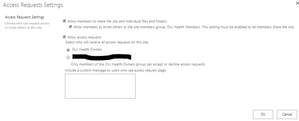

StephenRice I have TEAMS-enabled modern team sites and I would like the Owners group to receive the request for access emails. It appears to be hard-coded, if you will, to the "Admins" which I am assuming are the site collection admins. This role is, virtually, obsolete in modern, flat architecture unless there's something I'm overlooking. How do I get my modern sites to reference the Owners perm group instead of the collection admins?


Hi Dean_Gross and StephenRice -
Well 2 years on from my last post on this thread, and now that I've got 90% of our users into TEAMS I've had to revisit "Access Request Settings" because
- team members copy file links and send them to non-team members
- Who then get "Request Access boxes", that they fill in and click send
- team owners get the X person has requested access to Y document, emails then go and Approve or the request.
This works, but because it is outside the normal TEAMS security model (and these permissions aren't easily visible in teams) is a big pain point when there are security related issues.
So I was looking for a way to Untick the "Allow Access Requests > Access request settings" programmatically with powershell.
Ideally I'd like all new SharePoint sites to have this unticked, but I can't find how to set this.
What I did find was Salaudeen Rajack's code to do this for a single site or for all sites in the Tenant.
https://www.sharepointdiary.com/2020/03/sharepoint-online-disable-access-requests-for-all-sites-using-powershell.html
Note this June 12th 2021 post is the one that works for me.
I'm posting this so that anyone who finds this thread - can have some peace and avoid having to fix up broken security inheritance. 🙂
- Dorje-McKinnonDec 10, 2021Iron Contributor
One thing I've found out in going through this, is that :
- IF the team owner approves an "Access request" for myDocument.docx to Bob. When you view the information panel for the myDocument.docx file , then click "Manage access", you'll see Bob's name under the "Direct Access" heading. And you can remove it from hear without having to go back into the AccessRequests list (/sites/sitename/Access%20Requests/pendingreq.aspx) to remove Bob's access.
Given that
- Users will send links rather than using the share button, no matter how much training we give them.
AND - Team Owners get the "Access request" email, when the recipient of the link clicks on it and get's the "request access" form and submits it
AND - It is only one click for the team owner to approve access, rather than multiple clicks to Share the file/folder to the person or add them to the TEAM
AND - It is easy to revoke access, via the Information panel for the file or folder, or via the AccessRequests list (/sites/sitename/Access%20Requests/pendingreq.aspx) [Microsoft this could be easier to get to]
I've decided that for my tenant I'm going to leave this hang over from earlier versions of SharePoint in place. Because it is easy for team members and team owners. Even though I don't like the fact it is a bit messy from an admin perspective 🙂
I hope this is useful to others.