Forum Discussion

Nicholas Byng-Maddick
May 04, 2018Brass Contributor
SharePoint Access Requests Settings
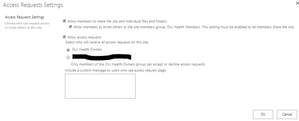
This has long been a problem but there appears to have been a subtle but significant change to the abilities here in SPO. It appears you can now specify the site owners group as the destination of t...

Fromelard
Jul 13, 2018Iron Contributor
A part of the PS commands are not yet integrated into CSOM
This is why is developed that script for example:
<#
Source:
 - https://sharepoint.stackexchange.com/questions/219634/sp-online-powershell-web-requestaccessemail-is-not-returning-any-value
 - https://sharepoint.stackexchange.com/questions/241415/csom-property-for-access-request-group
 - https://msdn.microsoft.com/en-us/library/office/microsoft.sharepoint.client.web.aspx
 - https://techcommunity.microsoft.com/t5/SharePoint-Developer/Changing-the-quot-Allow-members-to-share-quot-SharePoint-site/td-p/18562
#>

[string]$MyRootWebURL = "https://tenant.sharepoint.com/sites/YourSiteCollection"
[string]$SiteOwnerEmailAdress = ""
[boolean]$ChangeRequestAccessEmail = $true

[string]$username = "admin@tenant.onmicrosoft.com"
[string]$PwdTXTPath = "C:\SECUREDPWD\ExportedPWD-$($username).txt"

$secureStringPwd = ConvertTo-SecureString -string (Get-Content $PwdTXTPath)
$creds = New-Object System.Management.Automation.PSCredential $username, $secureStringPwd

function Load-DLLandAssemblies
{
	[string]$defaultDLLPath = ""

	# Load assemblies to PowerShell session

	$defaultDLLPath = "C:\Program Files\SharePoint Online Management Shell\Microsoft.Online.SharePoint.PowerShell\Microsoft.SharePoint.Client.dll"
	[System.Reflection.Assembly]::LoadFile($defaultDLLPath)

	$defaultDLLPath = "C:\Program Files\SharePoint Online Management Shell\Microsoft.Online.SharePoint.PowerShell\Microsoft.SharePoint.Client.Runtime.dll"
	[System.Reflection.Assembly]::LoadFile($defaultDLLPath)

	$defaultDLLPath = "C:\Program Files\SharePoint Online Management Shell\Microsoft.Online.SharePoint.PowerShell\Microsoft.Online.SharePoint.Client.Tenant.dll"
	[System.Reflection.Assembly]::LoadFile($defaultDLLPath)
}

Function Invoke-LoadMethod() {
param(
   [Microsoft.SharePoint.Client.ClientObject]$Object = $(throw "Please provide a Client Object"),
   [string]$PropertyName
)
   $ctx = $Object.Context
   $load = [Microsoft.SharePoint.Client.ClientContext].GetMethod("Load")
   $type = $Object.GetType()
   $clientLoad = $load.MakeGenericMethod($type)


   $Parameter = [System.Linq.Expressions.Expression]::Parameter(($type), $type.Name)
   $Expression = [System.Linq.Expressions.Expression]::Lambda(
            [System.Linq.Expressions.Expression]::Convert(
                [System.Linq.Expressions.Expression]::PropertyOrField($Parameter,$PropertyName),
                [System.Object]
            ),
            $($Parameter)
   )
   $ExpressionArray = [System.Array]::CreateInstance($Expression.GetType(), 1)
   $ExpressionArray.SetValue($Expression, 0)
   $clientLoad.Invoke($ctx,@($Object,$ExpressionArray))
}

function Get-SPOSubWebs
{
	Param(
        [Microsoft.SharePoint.Client.ClientContext]$Context,
        [Microsoft.SharePoint.Client.Web]$RootWeb
    )

	$Webs = $RootWeb.Webs
	$Context.Load($Webs)
	$Context.ExecuteQuery()
	ForEach ($sWeb in $Webs)
	{
		Write-host " -------------------------------------------------------- "
		Write-host "       -->> SubSite:", $sWeb.URL -ForegroundColor green
		Invoke-LoadMethod -Object $sWeb -PropertyName "HasUniqueRoleAssignments"
		$context.ExecuteQuery()
		Write-Host "       -->> Has Unique Permissions:", $sWeb.HasUniqueRoleAssignments

		if($sWeb.HasUniqueRoleAssignments)
		{

			Invoke-LoadMethod -Object $sWeb -PropertyName "RequestAccessEmail"
			Invoke-LoadMethod -Object $sWeb -PropertyName "MembersCanShare"
			Invoke-LoadMethod -Object $sWeb -PropertyName "AssociatedMemberGroup"
			Invoke-LoadMethod -Object $sWeb -PropertyName "AssociatedOwnerGroup"
			$context.ExecuteQuery()
			Write-Host "            -->> Request Access Email Before change:", $sWeb.RequestAccessEmail, " - Member Can Share:", $sWeb.MembersCanShare, "- AssociatedMemberGroup.AllowMembersEditMembership: " $sWeb.AssociatedMemberGroup.AllowMembersEditMembership -ForegroundColor Red
			Write-Host "            -->> AssociatedOwnerGroup Name:", $sWeb.AssociatedOwnerGroup.Title   -ForegroundColor Yellow

			if(($ChangeRequestAccessEmail) -and ($sWeb.RequestAccessEmail -ne $SiteOwnerEmailAdress))
			{
				Write-Host "      ===->> Request Access Email to change"
				$sWeb.RequestAccessEmail = $SiteOwnerEmailAdress
				$sWeb.Update()
				$context.ExecuteQuery()
				Invoke-LoadMethod -Object $sWeb -PropertyName "RequestAccessEmail"
				$context.ExecuteQuery()
				Write-Host "   -->> Request Access Email After change:", $sWeb.RequestAccessEmail
			}

		}
		Get-SPOSubWebs -Context $Context -RootWeb $sWeb
	}
}


cls
Write-Host " ---------------------------------------------- "
Load-DLLandAssemblies
Write-Host " ---------------------------------------------- "

	$Myctx = New-Object Microsoft.SharePoint.Client.ClientContext($MyRootWebURL)

	$Myctx.Credentials = New-Object Microsoft.SharePoint.Client.SharePointOnlineCredentials($creds.UserName,$creds.Password)
	$Myctx.RequestTimeout = 1000000 # milliseconds
	$MyspoRootweb = $Myctx.Web
	$Myctx.Load($MyspoRootweb)
	$Myctx.ExecuteQuery()

Write-Host " "
Write-Host " ---------------------------------------------------------"
Write-Host "  >>>> # Server Version:" $Myctx.ServerVersion " # <<<<<<" -ForegroundColor Green
Write-Host " ---------------------------------------------------------"
Write-Host " "

Write-host " -------------------------------------------------------- "
Write-host "   -->> RootSite:", $MyspoRootweb.URL -ForegroundColor green

Invoke-LoadMethod -Object $MyspoRootweb -PropertyName "RequestAccessEmail"
Invoke-LoadMethod -Object $MyspoRootweb -PropertyName "MembersCanShare"
Invoke-LoadMethod -Object $MyspoRootweb -PropertyName "AssociatedMemberGroup"
Invoke-LoadMethod -Object $MyspoRootweb -PropertyName "AssociatedOwnerGroup"
$Myctx.ExecuteQuery()

Write-Host "   -->> Request Access Email Before change:", $MyspoRootweb.RequestAccessEmail -ForegroundColor Red
Write-Host "       ==> Member Can Share:", $MyspoRootweb.MembersCanShare
Write-Host "       ==> AssociatedMemberGroup Name:", $MyspoRootweb.AssociatedMemberGroup.Title ,"- AssociatedMemberGroup.AllowMembersEditMembership: " $MyspoRootweb.AssociatedMemberGroup.AllowMembersEditMembership  -ForegroundColor Yellow
Write-Host "       ==> AssociatedOwnerGroup Name:", $MyspoRootweb.AssociatedOwnerGroup.Title   -ForegroundColor Yellow

if(($ChangeRequestAccessEmail) -and ($MyspoRootweb.RequestAccessEmail -ne $SiteOwnerEmailAdress))
{
	Write-Host "   ===->> Request Access Email to change"
	$MyspoRootweb.RequestAccessEmail = $SiteOwnerEmailAdress
	$MyspoRootweb.Update()
	$Myctx.ExecuteQuery()
	Invoke-LoadMethod -Object $MyspoRootweb -PropertyName "RequestAccessEmail"
	$Myctx.ExecuteQuery()
	Write-Host "   -->> Request Access Email After change:", $MyspoRootweb.RequestAccessEmail
}

Get-SPOSubWebs -Context $Myctx -RootWeb $MyspoRootweb
That will give you the solution to manage that value at any level of the site collection.
To remove the access request, you just have to let the value "" into the variable $SiteOwnerEmailAdress
If you want to set it to someone, set the email address.
You can adapt that code as you need.
Fab

Eason Lu
Nov 27, 2018Copper Contributor
Is there any program way to set the site group owners to receive all the access requests? It is easy to do in the browser, but CSOM/PowerShell cannot do this. There is no email for the site group owners.
The API cannot accept multiple email addresses for the RequestAccessEmail, which worked before this change.