Forum Discussion

SharePoint Access Requests Settings
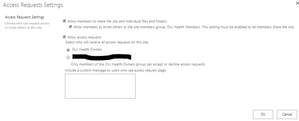

I also like the change but I have a question which I have asked in other threads related to if its possible to disable the "allow access requests" across multiple sites via PS. I can see there are commands available for setting "Allow members to share" and "Allow members to invite"...but nothing related to "Allow access requests". Cheers

Dear Damien,
If you use the script to set the access request with an empty string into the email address, the access request will be automatically disable.
Fab
 Eason LuNov 27, 2018Copper Contributor
Is there any program way to set the site group owners to receive all the access requests? It is easy to do in the browser, but CSOM/PowerShell cannot do this. There is no email for the site group owners.
The API cannot accept multiple email addresses for the RequestAccessEmail, which worked before this change.- FromelardJul 13, 2018Iron Contributor
A part of the PS commands are not yet integrated into CSOM
This is why is developed that script for example:
<#
Source:
 - https://sharepoint.stackexchange.com/questions/219634/sp-online-powershell-web-requestaccessemail-is-not-returning-any-value
 - https://sharepoint.stackexchange.com/questions/241415/csom-property-for-access-request-group
 - https://msdn.microsoft.com/en-us/library/office/microsoft.sharepoint.client.web.aspx
 - https://techcommunity.microsoft.com/t5/SharePoint-Developer/Changing-the-quot-Allow-members-to-share-quot-SharePoint-site/td-p/18562
#>

[string]$MyRootWebURL = "https://tenant.sharepoint.com/sites/YourSiteCollection"
[string]$SiteOwnerEmailAdress = ""
[boolean]$ChangeRequestAccessEmail = $true

[string]$username = "admin@tenant.onmicrosoft.com"
[string]$PwdTXTPath = "C:\SECUREDPWD\ExportedPWD-$($username).txt"

$secureStringPwd = ConvertTo-SecureString -string (Get-Content $PwdTXTPath)
$creds = New-Object System.Management.Automation.PSCredential $username, $secureStringPwd

function Load-DLLandAssemblies
{
	[string]$defaultDLLPath = ""

	# Load assemblies to PowerShell session

	$defaultDLLPath = "C:\Program Files\SharePoint Online Management Shell\Microsoft.Online.SharePoint.PowerShell\Microsoft.SharePoint.Client.dll"
	[System.Reflection.Assembly]::LoadFile($defaultDLLPath)

	$defaultDLLPath = "C:\Program Files\SharePoint Online Management Shell\Microsoft.Online.SharePoint.PowerShell\Microsoft.SharePoint.Client.Runtime.dll"
	[System.Reflection.Assembly]::LoadFile($defaultDLLPath)

	$defaultDLLPath = "C:\Program Files\SharePoint Online Management Shell\Microsoft.Online.SharePoint.PowerShell\Microsoft.Online.SharePoint.Client.Tenant.dll"
	[System.Reflection.Assembly]::LoadFile($defaultDLLPath)
}

Function Invoke-LoadMethod() {
param(
   [Microsoft.SharePoint.Client.ClientObject]$Object = $(throw "Please provide a Client Object"),
   [string]$PropertyName
)
   $ctx = $Object.Context
   $load = [Microsoft.SharePoint.Client.ClientContext].GetMethod("Load")
   $type = $Object.GetType()
   $clientLoad = $load.MakeGenericMethod($type)


   $Parameter = [System.Linq.Expressions.Expression]::Parameter(($type), $type.Name)
   $Expression = [System.Linq.Expressions.Expression]::Lambda(
            [System.Linq.Expressions.Expression]::Convert(
                [System.Linq.Expressions.Expression]::PropertyOrField($Parameter,$PropertyName),
                [System.Object]
            ),
            $($Parameter)
   )
   $ExpressionArray = [System.Array]::CreateInstance($Expression.GetType(), 1)
   $ExpressionArray.SetValue($Expression, 0)
   $clientLoad.Invoke($ctx,@($Object,$ExpressionArray))
}

function Get-SPOSubWebs
{
	Param(
        [Microsoft.SharePoint.Client.ClientContext]$Context,
        [Microsoft.SharePoint.Client.Web]$RootWeb
    )

	$Webs = $RootWeb.Webs
	$Context.Load($Webs)
	$Context.ExecuteQuery()
	ForEach ($sWeb in $Webs)
	{
		Write-host " -------------------------------------------------------- "
		Write-host "       -->> SubSite:", $sWeb.URL -ForegroundColor green
		Invoke-LoadMethod -Object $sWeb -PropertyName "HasUniqueRoleAssignments"
		$context.ExecuteQuery()
		Write-Host "       -->> Has Unique Permissions:", $sWeb.HasUniqueRoleAssignments

		if($sWeb.HasUniqueRoleAssignments)
		{

			Invoke-LoadMethod -Object $sWeb -PropertyName "RequestAccessEmail"
			Invoke-LoadMethod -Object $sWeb -PropertyName "MembersCanShare"
			Invoke-LoadMethod -Object $sWeb -PropertyName "AssociatedMemberGroup"
			Invoke-LoadMethod -Object $sWeb -PropertyName "AssociatedOwnerGroup"
			$context.ExecuteQuery()
			Write-Host "            -->> Request Access Email Before change:", $sWeb.RequestAccessEmail, " - Member Can Share:", $sWeb.MembersCanShare, "- AssociatedMemberGroup.AllowMembersEditMembership: " $sWeb.AssociatedMemberGroup.AllowMembersEditMembership -ForegroundColor Red
			Write-Host "            -->> AssociatedOwnerGroup Name:", $sWeb.AssociatedOwnerGroup.Title   -ForegroundColor Yellow

			if(($ChangeRequestAccessEmail) -and ($sWeb.RequestAccessEmail -ne $SiteOwnerEmailAdress))
			{
				Write-Host "      ===->> Request Access Email to change"
				$sWeb.RequestAccessEmail = $SiteOwnerEmailAdress
				$sWeb.Update()
				$context.ExecuteQuery()
				Invoke-LoadMethod -Object $sWeb -PropertyName "RequestAccessEmail"
				$context.ExecuteQuery()
				Write-Host "   -->> Request Access Email After change:", $sWeb.RequestAccessEmail
			}

		}
		Get-SPOSubWebs -Context $Context -RootWeb $sWeb
	}
}


cls
Write-Host " ---------------------------------------------- "
Load-DLLandAssemblies
Write-Host " ---------------------------------------------- "

	$Myctx = New-Object Microsoft.SharePoint.Client.ClientContext($MyRootWebURL)

	$Myctx.Credentials = New-Object Microsoft.SharePoint.Client.SharePointOnlineCredentials($creds.UserName,$creds.Password)
	$Myctx.RequestTimeout = 1000000 # milliseconds
	$MyspoRootweb = $Myctx.Web
	$Myctx.Load($MyspoRootweb)
	$Myctx.ExecuteQuery()

Write-Host " "
Write-Host " ---------------------------------------------------------"
Write-Host "  >>>> # Server Version:" $Myctx.ServerVersion " # <<<<<<" -ForegroundColor Green
Write-Host " ---------------------------------------------------------"
Write-Host " "

Write-host " -------------------------------------------------------- "
Write-host "   -->> RootSite:", $MyspoRootweb.URL -ForegroundColor green

Invoke-LoadMethod -Object $MyspoRootweb -PropertyName "RequestAccessEmail"
Invoke-LoadMethod -Object $MyspoRootweb -PropertyName "MembersCanShare"
Invoke-LoadMethod -Object $MyspoRootweb -PropertyName "AssociatedMemberGroup"
Invoke-LoadMethod -Object $MyspoRootweb -PropertyName "AssociatedOwnerGroup"
$Myctx.ExecuteQuery()

Write-Host "   -->> Request Access Email Before change:", $MyspoRootweb.RequestAccessEmail -ForegroundColor Red
Write-Host "       ==> Member Can Share:", $MyspoRootweb.MembersCanShare
Write-Host "       ==> AssociatedMemberGroup Name:", $MyspoRootweb.AssociatedMemberGroup.Title ,"- AssociatedMemberGroup.AllowMembersEditMembership: " $MyspoRootweb.AssociatedMemberGroup.AllowMembersEditMembership  -ForegroundColor Yellow
Write-Host "       ==> AssociatedOwnerGroup Name:", $MyspoRootweb.AssociatedOwnerGroup.Title   -ForegroundColor Yellow

if(($ChangeRequestAccessEmail) -and ($MyspoRootweb.RequestAccessEmail -ne $SiteOwnerEmailAdress))
{
	Write-Host "   ===->> Request Access Email to change"
	$MyspoRootweb.RequestAccessEmail = $SiteOwnerEmailAdress
	$MyspoRootweb.Update()
	$Myctx.ExecuteQuery()
	Invoke-LoadMethod -Object $MyspoRootweb -PropertyName "RequestAccessEmail"
	$Myctx.ExecuteQuery()
	Write-Host "   -->> Request Access Email After change:", $MyspoRootweb.RequestAccessEmail
}

Get-SPOSubWebs -Context $Myctx -RootWeb $MyspoRootweb
That will give you the solution to manage that value at any level of the site collection.
To remove the access request, you just have to let the value "" into the variable $SiteOwnerEmailAdress
If you want to set it to someone, set the email address.
You can adapt that code as you need.
Fab
 AnonymousJul 13, 2018
Hi Fabrice,
I have the same issue.
In case the option is "e-mail address" it works well. But in case the option is default it does not work. I can not disable the "allowaccess requests" in case option is default via PS.