Forum Discussion

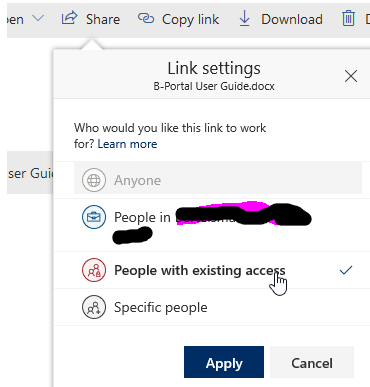
Share to "People with existing access" breaks role inheritance
- Jan 15, 2019
Hi all,
The bad news is that this is unexpected. When sharing with a "People with existing access link", it should only send the user a canonical URL and it definitely shouldn't permission the user to the item.
The good news is that a fix is already rolling out and so this should go away shortly :)
Thanks!
Stephen Rice
OneDrive Program Manager II

StephenRice , This powershell is at least a start, but I can't get this to work on any SPO site that has been created by an O365 Group, hence a SPO site created by Teams. It will work on any site created from SPO Admin Tenant. Will this be available to work on SPO Sites created by Groups? It will be essential to our architecture, often times we have the Teams site and Group ownership for the Team but then they will have content that needs to be shared outside of the Teams and we use the attached SPO site for this which has assigned permissions access that have been given to a larger group, minus the associated Document Library. For groups can you use -DefaultSharingLinkType and change that parameter to Existing Access somehow?
Set-SPOSite -identity https://*******.sharepoint.com/sites/BPM -DefaultLinkToExistingAccess 1
Set-SPOSite : https://******.sharepoint.com/sites/BPM is a Groups site collection. The valid parameters for this
type of site collection are '-Identity', '-AllowSelfServiceUpgrade', '-DefaultLinkPermission',
'-DefaultSharingLinkType', '-DenyAddAndCustomizePages', '-DisableCompanyWideSharingLinks',
'-DisableSharingForNonOwners', '-LockState', '-Owner', '-ResourceQuota', '-ResourceQuotaWarningLevel',
'-SandboxedCodeActivationCapability', '-SharingCapability', '-ShowPeoplePickerSuggestionsForGuestUsers',
'-SocialBarOnSitePagesDisabled', '-StorageQuota', '-StorageQuotaReset', and '-StorageQuotaWarningLevel'.
At line:1 char:1
+ Set-SPOSite -identity https://******.sharepoint.com/sites/BPM -De ...
+ ~~~~~~~~~~~~~~~~~~~~~~~~~~~~~~~~~~~~~~~~~~~~~~~~~~~~~~~~~~~~~~~~~~~~~
+ CategoryInfo : NotSpecified: (:) [Set-SPOSite], ServerException
+ FullyQualifiedErrorId : Microsoft.SharePoint.Client.ServerException,Microsoft.Online.SharePoint.PowerShell.SetSi
te

 Microsoft
Hi tyeseye,
This should be available on Group sites today. Please try updating to the latest version of PowerShell (I had this problem this morning when I attempted to do the same thing  ). You can also use the new UI for the feature in the modern SharePoint admin center! You just need to select the site and open the sharing panel and it should be there. Hope that helps!
Stephen Rice
Senior Program Manager, OneDrive
- tyeseyeApr 14, 2020Copper Contributor
Thank you StephenRice really appreciate it, I will update my PS now.
Cheers,
Tye Eyden
Business System Analyst
New Belgium