Forum Discussion

Suzanne Hunt
Mar 22, 2018Brass Contributor
Remove columns from Upload.aspx page in Document Library
Hi Everyone,
I've added some columns to a document library to allow views to be created grouping the documents by current month, previous month etc. The problem is those fields are now showing on t...
 DeletedMar 27, 2018
Did you try hiding columns like below from document content type
- Document Library > Library Tab > Library Settings > Advanced Settings
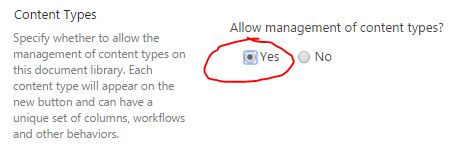
- Click Yes radio button under Allow management of Content Types. Click OK
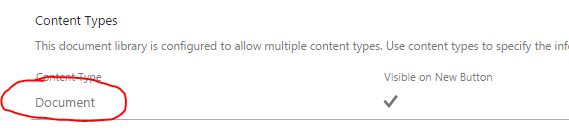
- Scroll down to the Document Content Type, click on it (Document)
- Click on the first column you want to hide

- Choose Hidden Radio button, click OK

- Repeat above step for another column
- Both columns will no longer appear
Deleted
Mar 26, 2018Not applicable
Can you please share us a screenshot of this issue?
Thanks
 Suzanne HuntMar 26, 2018Brass Contributor
Sure, its all the fields with an underscore in front:
- DeletedMar 27, 2018Not applicable
Did you try hiding columns like below from document content type
- Document Library > Library Tab > Library Settings > Advanced Settings
- Click Yes radio button under Allow management of Content Types. Click OK
- Scroll down to the Document Content Type, click on it (Document)
- Click on the first column you want to hide
- Choose Hidden Radio button, click OK
- Repeat above step for another column
- Both columns will no longer appear
- Suzanne HuntMar 27, 2018Brass Contributor
Thankyou! I had a brain freeze and forgotten about that one (not using content types on this site).
But that worked perfectly :-)
Much appreciated!