Forum Discussion

Reduce the height of the Upper boarder (where the logo & site title renders) and the Page banner
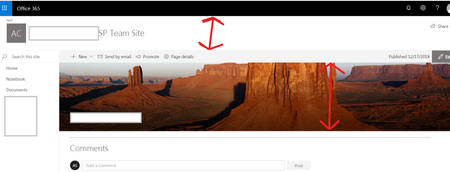

Hi John, so for the white space with the search box at the top there is no much you can do at the moment. That being said, they announced at Ignite that they will be releasing 3 options to adjust the size of the header area. That was for modern sites, but I imagine that it may work for a modern page in a classic site.
For the image banners you should be able to edit the web part and see an "X" option on the left. Clicking this will allow you to remove the image. Alternatively, they are releasing the ability to choose 4 formats for the banner area. One option allows you to remove the image just leaving the title. I currently have this option available in my developer tenant, but not yet in our production tenant.
If you are desperate you could create a SPFX extension that overrides the CSS and hides those elements . DISCLAIMER: This is definitely not a best practice and a non-sanctioned customization practice.
Hope this helps,
Dave
 john johnDec 18, 2018Steel Contributor
Dave Walkerthanks for your reply. please find my comments:-
Dave Walker wrote:That being said, they announced at Ignite that they will be releasing 3 options to adjust the size of the header area. That was for modern sites, but I imagine that it may work for a modern page in a classic site.
so are those options currently available ? did you get them inside your development tenant?
For the image banners you should be able to edit the web part and see an "X" option on the left. Clicking this will allow you to remove the image. Alternatively, they are releasing the ability to choose 4 formats for the banner area. One option allows you to remove the image just leaving the title. I currently have this option available in my developer tenant, but not yet in our production tenant.I already have those options inside our tenant as follow:-
But what i need is to still have the "Image and Title", but to reduce its height ? seems this is not something that we can do from the settings?
If you are desperate you could create a SPFX extension that overrides the CSS and hides those elements . DISCLAIMER: This is definitely not a best practice and a non-sanctioned customization practice.
as you mentioned ... in sharepoint online doing such customization should be avoided i think ...
can you please advice on my above 3 points?
- Dave WalkerDec 19, 2018Tin Contributor
John,
You: so are those options currently available ? did you get them inside your development tenant?
My Answer: No, but I saw them demoed. This should be coming soon. The O365 roadmap indicates it is in development and due for release January 2019. Here is the O365 roadmap item:
SharePoint sites: new site header layouts
Now, site owners can reclaim some of the vertical space at the top of the site and highlight the main page content instead. There will be three new choices: standard, minimal and compact.
- Featured ID: 33131
- Added to Roadmap: 8/29/2018
- Last Modified: 12/14/2018
- Tags: SharePoint, Online, O365
You: But what i need is to still have the "Image and Title", but to reduce its height ? seems this is not something that we can do from the settings?
Answer: That's correct. However, they are working on page designs (like templates) that I'm hoping will allow for more flexibility to create customized page templates. Like you, I am waiting for this functionality as I would like to create page templates without any header at all. Looks like page designs are set to be release very soon (December 2018). Here is the O365 roadmap item:
SharePoint pages: custom page designs
Save your creators time when they generate new SharePoint pages, and ensure that the consistency of experience for how you promote your content and information remains intact. You can control the design and layout of your pages in a similar fashion as you can with custom site designs and themes using site scripts.
- Featured ID: 33136
- Added to Roadmap
- : 8/29/2018
- Last Modified: 12/14/2018
- Tags: O365, SharePoint
Hope this helps,
Dave