Forum Discussion

Modern UI bulk edit changes content type of selected items to first one selected
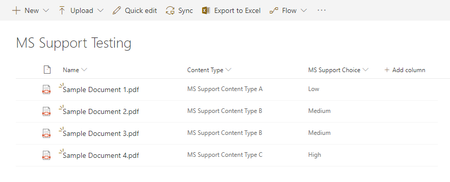

Hi Simon, did you get any answers from SharePoint Engineering on this?
Just to add something here, I think this behaviour in general might be related to how editing items currently works in modern, on lists or on libraries. Currently there's no way to unselect a value in a dropdown field (Choice or Lookup). In the classic interface we had a (None) option to clear the value, but not anymore. I think it's huge oversight from the Engineering and might be causing your problem as well. The first value in a dropdown gets selected even if it doesn't show on the form. Notice how your content types got changed to the MS Support Content Type A which is the first in the list of content types, and not to the content type of the first selected list item.
To reproduce, just try to add new list item, puts a cursor on the first field and start tabbing through the fields, all dropdown fields will automatically get their first value selected, even if they are not required! And there no (None) value to choose to clear them:

Hi Elena Nakhmanson ,
Prompted by your message, I have just checked and the bug appears to have been fixed. I think it is a recent update as I'm sure I checked not that long ago and it was still happening.
Sadly, despite raising the issue via Microsoft Support, the only notification I received was that the Engineering team had acknowledged the issue. There was no notification received to say the fix was being rolled out.
- Elena NakhmansonFeb 21, 2019Copper Contributor
Hi Simon, thanks for the update. It seems your issue has been fixed, however an ability to clear a value from a non-required dropdown is still missing. Will have to submit a new support request :(