Forum Discussion

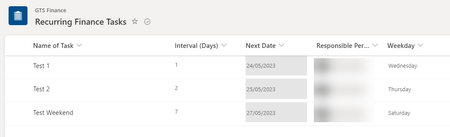
Power Automate: IF date falls on a weekend THEN subtract 2 days (SharePoint List)
- May 25, 2023
RobinProctor you seem to be slightly over-complicating it. In my example below there is the Review Date column, a calculated column for Weekday using the formula
=IF(ISBLANK([Review Date]),"",TEXT([Review Date],"dddd"))
The WeekdayChecked column is a choice column with the choices No and Yes and a default value of No. The items that will be changed are Almeria (Sunday), Lubrin (Sunday), Mojacar (Saturday) and Villaricos (Sunday).
After the recurrence schedule trigger the first action is to get the items but I've added a filter query of WeekdayChecked eq 'No' so it's not having to check every item in the list every day.
The condition just needs to Weekday is equal to Saturday Or Weekday is equal to Sunday.
In the red if no channel add an update item action and change the WeekdayChecked Value column to Yes.
In the green if yes channel add 3 Compose actions. In the first one select Weekday from the dynamic content box (just there as a check really).
In the second one which I've renamed to ComposeReviewDate select Review Date from the dynamic content box.
In the third one which I've renamed to ComposeMinus2 add the expression
addDays(outputs('ComposeReviewDate'),-2)Finally, add an update item action and for the Review Date select the outputs of ComposeMinus2 and change the WeekdayChecked Value field to Yes.
After the flow runs the 4 items that we expected to be changed to 2 days earlier have been as shown below. Almeria, Lubrin and Villaricos now have a review date 2 days earlier on the Friday and Mojacar on the Thursday.
Hope that helps.
Rob
Los Gallardos
Microsoft Power Automate Community Super User

RobinProctor you seem to be slightly over-complicating it. In my example below there is the Review Date column, a calculated column for Weekday using the formula
=IF(ISBLANK([Review Date]),"",TEXT([Review Date],"dddd"))
The WeekdayChecked column is a choice column with the choices No and Yes and a default value of No. The items that will be changed are Almeria (Sunday), Lubrin (Sunday), Mojacar (Saturday) and Villaricos (Sunday).
After the recurrence schedule trigger the first action is to get the items but I've added a filter query of WeekdayChecked eq 'No' so it's not having to check every item in the list every day.
The condition just needs to Weekday is equal to Saturday Or Weekday is equal to Sunday.
In the red if no channel add an update item action and change the WeekdayChecked Value column to Yes.
In the green if yes channel add 3 Compose actions. In the first one select Weekday from the dynamic content box (just there as a check really).
In the second one which I've renamed to ComposeReviewDate select Review Date from the dynamic content box.
In the third one which I've renamed to ComposeMinus2 add the expression
addDays(outputs('ComposeReviewDate'),-2)
Finally, add an update item action and for the Review Date select the outputs of ComposeMinus2 and change the WeekdayChecked Value field to Yes.
After the flow runs the 4 items that we expected to be changed to 2 days earlier have been as shown below. Almeria, Lubrin and Villaricos now have a review date 2 days earlier on the Friday and Mojacar on the Thursday.
Hope that helps.
Rob
Los Gallardos
Microsoft Power Automate Community Super User
 RobinProctorMay 25, 2023Copper Contributor