Forum Discussion

"Page not found" coping the URL from document flyout
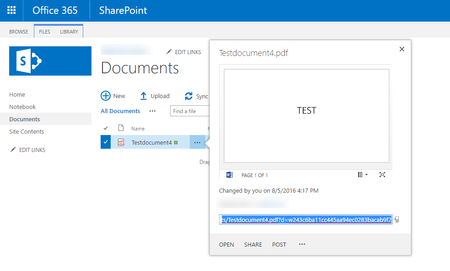

I think the issue you have EdjeZ is a different one. If you click on "Get a link" in the Call out, a link is created which can be shared to someone, granting him/her permissions to only this specific element whithout you have to share it specificly. To be honest, I don#t know why this is done automatically, but you can remove this link by going to the "Get a link" menu again and click on remove.
Eric Deferm we also have opened a ticket for this behavior. The only feedback we've received until yet, is that Microsoft can reproduce the issue and will forward this internally.

No, we DO have the same problem with the link in the call out (classic view).
I referred to "get a link" in the new modern view lay-out because I was hoping we could get a working link there, but that didn't work either.
We submitted a ticket too.
- EdjeZSep 27, 2016Brass Contributor
A little bit late, but I forgot to mention that the issue has been solved. Tested: Office formats (inc.Visio) , pictures, PDF. They all work again.
- EricDefermSep 27, 2016Steel Contributor
They have indeed fixed the links, but the links are no longer unbreakable :smileysad:
Standard link (today)
https://xyz.sharepoint.com/sites/portal_Training Material_Global_All/_layouts/15/guestaccess.aspx?guestaccesstoken=ti%2bjAbiFxmveEF7b0uhVA4nIRal%2buFwyb32HkfqrP34%3d&docid=2_1625bef58122c4453a36647564fcfef23&rev=1
Unbreakable link (previous)
https://xyz.sharepoint.com/sites/portal_Training%20Material_Global_All/Training/ourSibelco%20-%20Documentation/Guidelines/ourSibelco%20-%20Site%20Request%20Guidelines.pdf?d=w326aa4fec50c4450ac9def2bf1208eed
- EdjeZSep 28, 2016Brass Contributor
In the "old" library lay-out I get a working link (tried with PDF) and in the "modern" lay-out I'll have to choose "get a link" and change it in "limited link" (translated from the Dutch version, I don't know what the choice in English is). The other 2 choices generate a link with "guest access" in the URL.
