Forum Discussion

"Page not found" coping the URL from document flyout
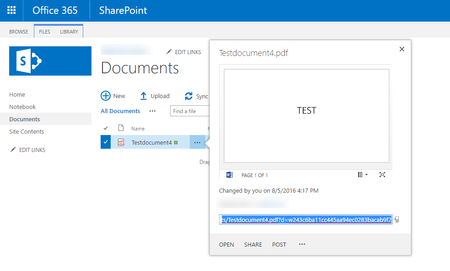


I think the issue you have EdjeZ is a different one. If you click on "Get a link" in the Call out, a link is created which can be shared to someone, granting him/her permissions to only this specific element whithout you have to share it specificly. To be honest, I don#t know why this is done automatically, but you can remove this link by going to the "Get a link" menu again and click on remove.
Eric Deferm we also have opened a ticket for this behavior. The only feedback we've received until yet, is that Microsoft can reproduce the issue and will forward this internally.
- EdjeZAug 12, 2016Brass Contributor
No, we DO have the same problem with the link in the call out (classic view).
I referred to "get a link" in the new modern view lay-out because I was hoping we could get a working link there, but that didn't work either.
We submitted a ticket too.
- EdjeZSep 27, 2016Brass Contributor
A little bit late, but I forgot to mention that the issue has been solved. Tested: Office formats (inc.Visio) , pictures, PDF. They all work again.
- EricDefermSep 27, 2016Steel Contributor
They have indeed fixed the links, but the links are no longer unbreakable :smileysad:
Standard link (today)
https://xyz.sharepoint.com/sites/portal_Training Material_Global_All/_layouts/15/guestaccess.aspx?guestaccesstoken=ti%2bjAbiFxmveEF7b0uhVA4nIRal%2buFwyb32HkfqrP34%3d&docid=2_1625bef58122c4453a36647564fcfef23&rev=1
Unbreakable link (previous)
https://xyz.sharepoint.com/sites/portal_Training%20Material_Global_All/Training/ourSibelco%20-%20Documentation/Guidelines/ourSibelco%20-%20Site%20Request%20Guidelines.pdf?d=w326aa4fec50c4450ac9def2bf1208eed
