Forum Discussion

Modern UI bulk edit changes content type of selected items to first one selected
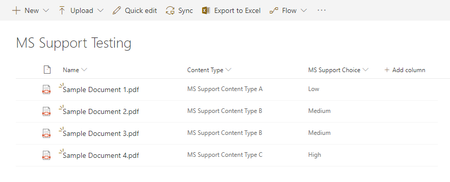

Yes i was able to reproduce the same issue in my tenant.
- Nov 07, 2018I could agree this is a bug, but when you edit a simple file you need to specify the content type and I think the bulk edit is just doing the same: you are updating metadata, but in the process is required a content type...if you don't select one, it takes one of the available
 SimonChalfontNov 07, 2018Brass Contributor
I think the point is that I am updating existing items that already have applied metadata, including the selection of the content type. In the example screenshots above I've simplified down the content types and columns for the benefit of MS Support (so that there can be no ambiguity about the issue) but in other examples the content type might have many more fields (e.g. "Effective Date" or "Projected Cost") and in the modern UI bulk editing experience if these columns are not modified then the underlying items retain whatever original value they have (i.e. they are not changed). The exception being "Content Type", which is arbitrarily overridden and set to the value of the first item selected.
I think the implications of this unexpected (and frankly wrong) behaviour has the potential to be highly damaging especially if processing logic is triggered on the change of items and decisions are based off the Content Type or how it might affect Labels, classification & retention in a large scale document management system.
I'm glad that it appears that others are able to confirm that they are able to re-create the issue. Time will tell how long it lands in front of someone in SharePoint Engineering.
