Forum Discussion

Andy5
Jul 27, 2017Steel Contributor
Make colleagues aware of a file without explicitly giving them permissions via Outlook
Hi all, Short: Can I send a link using Outlook like I can in OneDrive/SharePoint using the "Only people who already have access can use this link"?. This method in SharePoint/One Drive doesn't g...
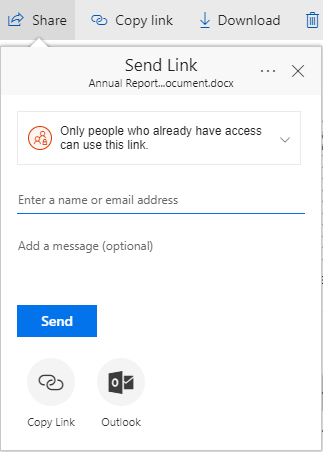

Andy5
Jul 30, 2017Steel Contributor
Hi Vasil,
Wouldn't it be great if I could attach a link to a file in SharePoint via Outlook without giving them explicit/unique permissions to the file?
Wouldn't it be great if I could attach a link to a file in SharePoint via Outlook without giving them explicit/unique permissions to the file?

Jul 30, 2017
Going back to your original screenshot you could always Copy Link and email that.
Or get the link out of the web interface.
Or lastly depending on the file, if it's an Office file you can go to the File->Share->Email menu and then hit "Send a Link".
Or get the link out of the web interface.
Or lastly depending on the file, if it's an Office file you can go to the File->Share->Email menu and then hit "Send a Link".
- StephenRiceJul 31, 2017
Microsoft
Hi Andrew,
The posts above are correct. You can get the "Existing access" link in SPO but not through Outlook. I'll pass this feedback along to the team though. Thanks!
Stephen Rice
OneDrive Program Manager II
- Andy5Jul 31, 2017Steel ContributorThanks, Stephen, that would be great. It would also make for great functionality for OneDrive file sharing as well via Outlook.
- Jul 31, 2017Thanks. Ever since the right-click action brought up the SPO/ODFB menu we've lost the ability to copy the URL of a file as now it generates a link for us. Now it takes extra clicks to get to the properties of the file to copy & paste, as the SPO/ODFB context menu has taken over the browser right-click action menu.
Often I have to do my above action of the email to send a link, only to copy it out of the email and paste it into an IM window or Yammer.
So if we could have that feature back it would be great. :-)
