Forum Discussion

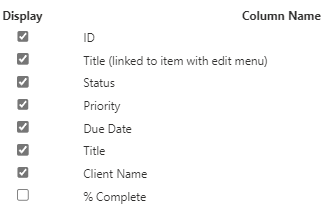
List Title displays [ID]_.000

Hello SA-KRP
the task list is a classic list template: https://learn.microsoft.com/en-us/sharepoint/troubleshoot/lists-and-libraries/task-list-shows-000?WT.mc_id=DX-MVP-5004845
You can use the grid view from a list or create a view formatting: https://learn.microsoft.com/en-us/sharepoint/dev/declarative-customization/view-formatting?WT.mc_id=DX-MVP-5004845
Best, Dave

Thanks for the response Dave.
So, am I understanding correctly that, MS SPO Tasks lists don't support the modern experience, and the "expectation" is these list types should be changed to Classic view?
EG MS does not fully support their own product, which I won't be surprised if you say yes.
And if we'd like to leave it in modern experience, we could use custom JSON to band-aid what MS own programmers can't or will not fix themselves?
My understanding is JSON will format the individual column so do you have any recommendations on which/what code sample we can use to get the missing "..." ellipse and/or fix the quirky display of .000 or having to add the [Title] column 2 times to get a view to work.
- DaveMehr365Jan 30, 2025MVP
Hi SA-KRP
maybe it's not your desired behaviour, but you have to see that the technology has evolved and tasks are not only managed in SharePoint (like on-prem) and old technologies are not always adopted, like the old classic task template. With Teams/Planner a new, overarching, technology for task management has been added. Embrace this transition.
No, there is formatting on views, not just column formatting. Here you will find a lot of information on this, including examples of possible view formatting:
https://learn.microsoft.com/en-us/sharepoint/dev/declarative-customization/view-formatting?WT.mc_id=DX-MVP-5004845Best, Dave