Forum Discussion

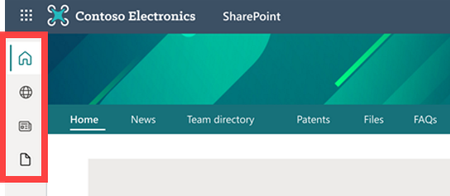
Introducing a SharePoint app bar that features global navigation
- Mar 22, 2021
You can disable the SharePoint app bar temporarily using PowerShell until October 31, 2021.
To run the PowerShell commands you will need either Global administrator or SharePoint administrator privileges. Follow below steps:
- Download the latest version of SharePoint online PowerShell
- Then, run the following command with administrator privileges:
Set-SPOTemporarilyDisableAppBar $truePlease Like if you found my reply helpful in any way!


You can disable the SharePoint app bar temporarily using PowerShell until October 31, 2021.
To run the PowerShell commands you will need either Global administrator or SharePoint administrator privileges. Follow below steps:
- Download the latest version of SharePoint online PowerShell
- Then, run the following command with administrator privileges:
Set-SPOTemporarilyDisableAppBar $true
Please Like if you found my reply helpful in any way!
 nlundqvistMar 29, 2021Brass ContributorI realized that our homesite isn't our root site. I.e I need to update permissions there and/or change root site 🙂
So yes I have it under control although it was a bit curious to realize that the root site is involved in this also.- ganeshsanapMar 29, 2021MVP
nlundqvist If you are a Home site administrator, it should work for you & show the global navigation properly.
Is it still asking for permissions or your issue solved?
- nlundqvistMar 22, 2021Brass Contributor
ganeshsanap This has been done and the app is present. It is when it is about to open the navigation pane I get the "ask for permissions" page. Even though I am the home site administrator.
- lance-augheyMar 22, 2021Iron Contributorganeshsanap, got it (all set), thanks.
The key being "temporarily"...it should be "permanently", like all the other fluff throws at us micro/small companies with one-man IT departments (and a single site collection) with already TOO much to deal with. I guess making everything temporary is the new path forward (yet another unnecessary and unannounced change coming the all-mighty Microsoft).
Remember CLUTTER? Yep, disabled that pile o' poo the day it was announced...what ever happened to that nonsense? Oh yeah, it's NO more. Apparently people didn't like it much. Huh.
What ever happened to user acceptance testing? It's common knowledge that throughout history, companies that fail to improve their offering based on approved changes, they all suffer/fail. Every. Single. One. - ganeshsanapMar 22, 2021MVP
To customize the global navigation, you need to set up a home site in SharePoint Online.
Make sure you have granted at least read permissions to users to see the global navigation.
Note: The first time you set up a home site, it might take some time for the changes to take effect.
Please Like if you found my reply helpful in any way!
- nlundqvistMar 22, 2021Brass ContributorWe now have it, but there's an issue with instead. Can't view the navigation. It asks for me to apply for permissions. Even though I am the primary administrator of our homesite.
Any thoughts/solutions on that out here?