Forum Discussion

ganeshsanap
Feb 26, 2021MVP
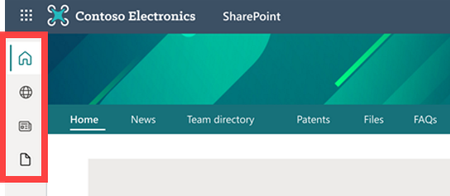
Introducing a SharePoint app bar that features global navigation
Microsoft is introducing a SharePoint app bar in SharePoint online that will feature global navigation in your SharePoint modern communication and team sites. The SharePoint app bar brings a cons...
- Mar 22, 2021
You can disable the SharePoint app bar temporarily using PowerShell until October 31, 2021.
To run the PowerShell commands you will need either Global administrator or SharePoint administrator privileges. Follow below steps:
- Download the latest version of SharePoint online PowerShell
- Then, run the following command with administrator privileges:
Set-SPOTemporarilyDisableAppBar $truePlease Like if you found my reply helpful in any way!


mattchowell
Mar 17, 2021Iron Contributor
I don't see any option to configure it with either an admin or non admin account. Could be because non-admin is not targeted release I suppose so doesn't see the bar yet....
Either way, I added some css to hide it permanently - but there really should be a switch somewhere to just turn it off.
Either way, I added some css to hide it permanently - but there really should be a switch somewhere to just turn it off.

Irene_Lappalainen225
Mar 17, 2021Brass Contributor
I was not able to configure it with non-admin account until that non-admin account was in TR mode. And there is a switch to temporarily switch it off, as stated above, you can run powershell Set-SPOTemporarilyDisableAppBar $true