Forum Discussion

How to make profile pictures visible in a list (people picker field)?
- Feb 11, 2020
Hello Toby McDaid,
Use the "Display a person's profile picture in a circle" column formatting sample.
I hope this helps.
Norm


Toby McDaid
For anyone insterested, here's the json for a 32px profile pic which shows the profile card on hover:
{
  "$schema": "https://developer.microsoft.com/json-schemas/sp/column-formatting.schema.json",
  "elmType": "div",
  "style": {
    "flex-direction": "column",
    "align-items": "flex-start",
    "margin-top": "6px",
    "padding-right": "8px",
    "width": "100%",
    "overflow": "hidden"
  },
  "children": [
    {
      "forEach": "personIterator in @currentField",
      "elmType": "div",
      "attributes": {
        "class": "ms-bgColor-neutralLight ms-fontColor-neutralSecondary"
      },
      "style": {
        "display": "inline-flex",
        "align-items": "center",
        "height": "32px",
        "overflow": "hidden",
        "border-radius": "12px",
        "margin": "2px"
      },
      "children": [
        {
          "elmType": "img",
          "attributes": {
            "src": "='/_layouts/15/userphoto.aspx?size=S&accountname=' + [$personIterator.email]",
            "title": "[$personIterator.title]"
          },
          "style": {
            "width": "32px",
            "height": "32px",
            "display": "block",
            "border-radius": "50%"
          }
        }
      ],
      "defaultHoverField": "[$personIterator]"
    }
  ]
} beachhead75Nov 01, 2023Copper Contributor
mccoyd
I modified this to allow the people detail window to open and have the "Name (with Picture)" functionality. I'm not good with JSON formatting or anything, but your post set me on the right path towards this. Thanks{ "$schema": "https://developer.microsoft.com/json-schemas/sp/column-formatting.schema.json", "elmType": "div", "style": { "flex-direction": "column", "align-items": "flex-start", "margin-top": "6px", "padding-right": "8px", "width": "100%", "overflow": "hidden" }, "children": [ { "forEach": "personIterator in @currentField", "elmType": "div", "attributes": { "class": "ms-bgColor-neutralLight ms-fontColor-neutralSecondary" }, "style": { "display": "inline-flex", "align-items": "center", "height": "32px", "overflow": "hidden", "border-radius": "12px", "margin": "2px" }, "children": [ { "elmType": "img", "attributes": { "src": "='/_layouts/15/userphoto.aspx?size=S&accountname=' + [$personIterator.email]", "title": "[$personIterator.title]" }, "style": { "width": "32px", "height": "32px", "display": "block", "border-radius": "50%", "margin": "15px" } }, { "elmType": "div", "txtContent": "[$personIterator.title]", "style": { "font-weight": "bold", "font-size": "12px", "margin": "15px" } } ], "defaultHoverField": "[$personIterator]" } ] }- mLantzApr 23, 2024Copper Contributor
I've modified this so that the image is left justified and smaller to better align with the out-of-the-box option.
{ "$schema": "https://developer.microsoft.com/json-schemas/sp/column-formatting.schema.json", "elmType": "div", "inlineEditField": "@currentField", "style": { "flex-direction": "column", "align-items": "flex-start", "margin-top": "6px", "padding-right": "8px", "width": "100%", "overflow": "hidden" }, "children": [ { "forEach": "personIterator in @currentField", "elmType": "div", "attributes": { "class": "ms-bgColor-neutralLight ms-fontColor-neutralSecondary" }, "style": { "display": "inline-flex", "align-items": "center", "height": "25px", "overflow": "hidden", "border-radius": "50px", "margin": "2px" }, "children": [ { "elmType": "img", "attributes": { "src": "='/_layouts/15/userphoto.aspx?size=S&accountname=' + [$personIterator.email]", "title": "[$personIterator.title]" }, "style": { "width": "25px", "height": "25px", "display": "block", "border-radius": "50%", "margin": "0px" } }, { "elmType": "div", "txtContent": "[$personIterator.title]", "style": { "font-weight": "normal", "font-size": "12px", "margin": "0px 10px 0px 5px" } } ], "defaultHoverField": "[$personIterator]" } ] } westonagreeneApr 24, 2024Copper ContributorMuch improved! Thank you!
- westonagreeneMar 12, 2024Copper Contributor
Thank you beachhead75 ! Looks beautiful!
 RafiAhmedDec 10, 2021Copper Contributor
My 2 cents;
- Remove lines # 5 and 6 to align multi-user icons inline (otherwise, each icon will be displayed in a new line)
- Change line # 25 to "margin-right": "-10px" for icon overlap look.
- ganeshsanapDec 12, 2021MVP
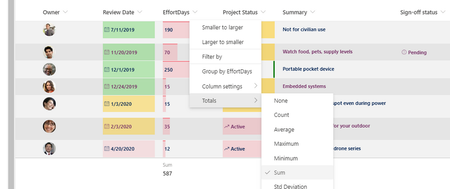
Toby McDaid bbsin No need to use JSON to show profile photos of users in person or group columns. You can now enable "Show profile photos" from column settings:
Check this blog by ChandaniPrajapati: How to show profile picture in Person column in SharePoint list/library?
Please click Mark as Best Response & Like if my post helped you to solve your issue. This will help others to find the correct solution easily. It also closes the item. If the post was useful in other ways, please consider giving it Like.
 bbsinJun 11, 2021Iron Contributor


