Forum Discussion

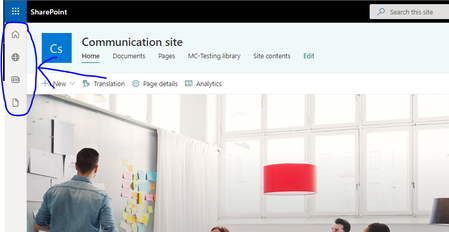
How to hide the Menu Bar at Left side
- Nov 24, 2021
LinkangThe SharePoint app bar can be temporarily disabled between today and when it becomes available to all customers to give customers more time to prepare for this change. Temporarily disabling the app bar will delay the rollout of this feature in your organization until March 31, 2022.
Temporarily disable the SharePoint app bar
- https://go.microsoft.com/fwlink/p/?LinkId=255251.
Connect to SharePoint as a https://docs.microsoft.com/en-us/sharepoint/sharepoint-admin-role in Microsoft 365. To learn how, see https://docs.microsoft.com/en-us/powershell/sharepoint/sharepoint-online/connect-sharepoint-online.
Run the following command:
PowerShellSet-SPOTemporarilyDisableAppBar $trueIf you need to confirm if the app bar has been disabled or enabled, check the app bar status by running the following command:
PowerShellGet-SPOTemporarilyDisableAppBar

Pol_Van_Dingenen
Hi Pol, Thanks for your reply,
I done all the steps, but My sharepoint still have the side bar.

Linkang With the Get-SPOTemporarilyDisableAppBar command you can see it returns a false, this means the Set-SPOTemporarilyDisableAppBar command didn't work the first time. You should try running it again until the Get command returns True.
When the Get command returns true you can navigate to a site and do a CTRL + F5 to test the results.
 M365_Architect_VanceSep 17, 2026Copper Contributor
For anyone landing on this thread looking for an active workaround: The legacy Set-SPOTemporarilyDisableAppBar PowerShell command has been completely retired by Microsoft at the platform level. If your leadership teams are rejecting the forced left-hand navigation rail due to screen real estate loss, resolving it now requires a local client-side SPFx customization.
Rather than attempting volatile DOM overrides that break during background cloud updates, you can deploy a refactored global override package directly into your local Tenant App Catalog. By leveraging native theme variable slot mapping, this architecture gives you granular control—globally minimizing the rail into a space-saving minimal look, or toggling the panel off completely per site collection simply via folder renaming adjustments ("On"/"Off"), keeping IT helpdesk overhead at absolute zero.
If your team is seeking a verified baseline deployment blueprint, you can step through the technical documentation and layout verification metrics on the M365 UI Overwrite & App Bar Workaround Demo Hub:
https://sharepointpackages.com/demos/disable-sharepoint-app-bar-workaround.html