Forum Discussion

ocin33
Aug 05, 2021Copper Contributor
How to get time from date and time column?
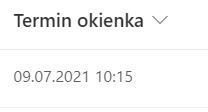
Hello guys, can someone tell me how to get the time from date and time column. I need time only in another column - it can be a text Thanks in advance 🙂
 Aug 05, 2021
Did you try TEXT function ? Something like
=TEXT([YourDate Column], "hh:mm:ss")You can use different formatting e.g =TEXT([Your Date Column],"h:mm AM/PM") to get result, and column can be type Date or Text.

Kristoffer_P
Apr 22, 2024Copper Contributor
=TEXT([YourDate Column], "hh:mm:ss") worked great. I am trying to get this same thing from two different date columns into a single new column. I got as far as =TEXT([YourDate Column], "hh:mm:ss"&"-") and see the time (ex. 1000-). But I am getting errors adding the second date column. Goal is 1000-1200.
Eugene_A
Apr 22, 2024Brass Contributor
not sure if this what you looking for, but then you should do DateDiff first if you need result ?
or have 2 TEXT joined like COncat(TEXT (first date) , TEXT( date2)
Something like that?