Forum Discussion

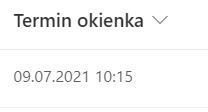
How to get time from date and time column?
 Aug 05, 2021
Did you try TEXT function ? Something like
=TEXT([YourDate Column], "hh:mm:ss")You can use different formatting e.g =TEXT([Your Date Column],"h:mm AM/PM") to get result, and column can be type Date or Text.
Did you try TEXT function ? Something like
=TEXT([YourDate Column], "hh:mm:ss")
You can use different formatting e.g =TEXT([Your Date Column],"h:mm AM/PM") to get result, and column can be type Date or Text.

=TEXT([YourDate Column], "hh:mm:ss") worked great. I am trying to get this same thing from two different date columns into a single new column. I got as far as =TEXT([YourDate Column], "hh:mm:ss"&"-") and see the time (ex. 1000-). But I am getting errors adding the second date column. Goal is 1000-1200.
- Eugene_AApr 22, 2024Brass Contributor
not sure if this what you looking for, but then you should do DateDiff first if you need result ?
or have 2 TEXT joined like COncat(TEXT (first date) , TEXT( date2)
Something like that?