Forum Discussion

rbennett Microsoft
Jan 27, 2022MicrosoftHow to display Document Library as one combined view vs. "In Channels" & "In Site Library"?
We have a SharePoint that is attached to a Team - previously the Documents view displayed a single list that merged the Teams & SharePoint folders. Now it separates them, as in below screenshot. This...
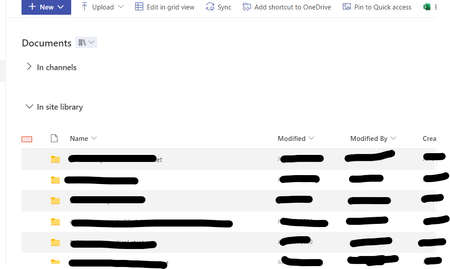

Rob_Hall
Jul 06, 2022Copper Contributor
rbennett I would like to disable it from the view since we don't use Teams folder and all this does is add vertical height to every library and add more scrolling.

patriciarodilosso
Oct 09, 2023Copper Contributor
Rob_Hall Any resolution on this? Don't like wasting the height. Thanks.
- Rob_HallOct 13, 2023Copper Contributor
patriciarodilosso yes, there is a solution.
Open the "Font" dialog box and go to the "Advanced" tab.
The "Position" drop down and the "By" data field let you move the content around as you please.
A bit silly that they use points and not actually measurements but a few try outs and you'll get what you want.
So glad I found this fix, this has annoyed me for a couple of decades now!!
- Peter2wxinOct 23, 2023Brass ContributorExcuse me, how can I find the "Font" dialog box?
Thanks!- Rob_HallOct 24, 2023Copper ContributorIn the ribbon "Font" area click on the little downward arrow in the bottom right hand corner.