Forum Discussion

How is the '+ New' menu populated in document libraries?
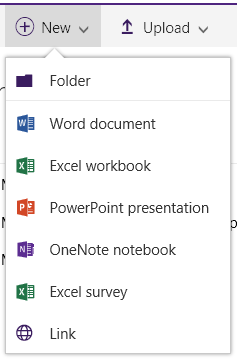


Hi, I've been playing around with Documents Sets and don't agree that everything is working by design, compared to the classic view.
This all might make sense if you are using a custom content type that represents a document, but it doesn't fit if it's document set.
Classic Experience:
- Single Content Type: Document Set
- You can only add "Document Set" at the top level
- You can add "Word, Excel, PowerPoint and OneNote" file within a document set
New Experience:
- Single Content Type: Document Set
- You can add "Document Set" and "Link" as content types at the top level
- You can again add "Document Set" and "Link" as a content type within the document set itself
To me the "new experience" doesn't make any sense, when I imagine an information worker that is supposed to "only work" within Office 365 and Office Online. How are we supposed to create documents in the document set, without using other tools (e.g. Uploads) ?
- Paul StorkSep 19, 2016MVP
One additional correction. I just removed the extra content type from my document set so its just document (the default) and now when inside the document set the new button shows Word, Excel, PowerPoint, OneNote and folder. Which is what I think you were expecting. Not sure why you are seeing something different.
- Paul StorkSep 19, 2016MVP
Did you add custom content types to the DocSet settings? Here's what I did and I get a different result then you.
- Created Doc Set content type called MyDocSet
- Created Excel content type with Excel spreadsheet as template
- Added Excel content type to MyDocSet settings
- Added MyDocSet content type to library content types and removed Document
When in the library the new button shows Folder, MyDocset, and Link
When inside the DocSet I see Document, Excel, and link.
That's the way I would expect it to operate. If you are doing DocSets you really should be managing the document content types that can be added to the Docset. If you leave it at just Document the new button won't operate correctly because its already been thrown off by the addition of the Document set Content type which cases it to show only the content types that have been added.
- Ivan54Sep 19, 2016Bronze Contributor
No, I have specifically not created special XLTX, DOTX Content Types.
What I have described is just a single content type "Document Set".
All I did was switch the library experience from NEW to CLASSIC, and suddenly you have different results.
If you come from the classic the experience that the NEW feels definitely off.
- Paul StorkSep 19, 2016MVP
That's the point of my second response. I'm wasn't seeing the same thing you are. When inside the document set, with just the default document content type in the settings, I was seeing Word, Excel, PowerPoint, OneNote, etc on the new button just like the classic experience. Now that I switched the experience between Classic and New I'm seeing what you are.
- Definately seems to be some kind of bug for the New button when switching between experiences
- If you manage content types that can be added into document set, instead of relying on just document, then you get a consisten list.
So I would recommend always using specific content types added in the document set settings to avoid the bug.