Forum Discussion

How is the '+ New' menu populated in document libraries?
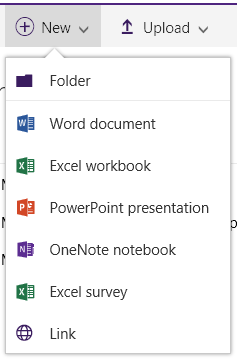

Does anyone know how to get to the +New, if you accidentally made everything unavailable on it by unticking everything?
the +New has disappeared entirely and I dont know how to get it back!
thanks

Hi JulieG1974 and others in the thread, I hope this info helps.
Introducing a new content type to a library, first you go to settings and "Allow management of content types". This "mode of operation" is what replaces the generic office templates in the "New" menu with the newly introduced content type(s) and allows you to assign a specific content type to documents in your library.
Once this is done, and if you have sufficient rights, you should be able to choose New > Edit new menu option and re-select the "lost" office templates.
In certain cases, if you have introduced only one custom content type to the library, which you've also set to be the default CT for all documents - you can go to library settings and revert "Allow management of content types" back to "No". This will reverse the process and re-introduce all the generic templates in the "New" menu whilst retaining the ability to assign your default custom content type to new docs. Remember though, this alternative is useful if you have only one custom content type which you have also set as default.
Hope his helps someone.