Forum Discussion

wm-thompson
Jan 29, 2024Brass Contributor
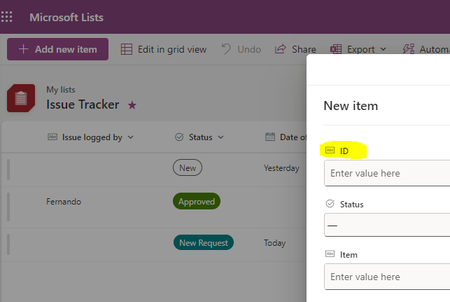
How do I make the ID column un-editable (again) in a Microsoft List?
There is an default ID column which comes with a List. As I understand, it auto-increments as the user adds a new row to the List. I decided to make this column visible to show in the List. I did...

ganeshsanap
Jan 31, 2024MVP
wm-thompson I think you have renamed the "Title" column to "ID" previously (changing display name of the Title column from "modern" list view). See the Abc type against "ID" column in the list form - by default ID is an "Number" type column and it should not have that Abc icon which is generally used for text columns (like "Title").
I have added more details and explanation about this issue at: How do I make the ID column un-editable (again) in a Microsoft List?
Please click Mark as Best Response & Like if my post helped you to solve your issue. This will help others to find the correct solution easily. It also closes the item. If the post was useful in other ways, please consider giving it Like.