Forum Discussion

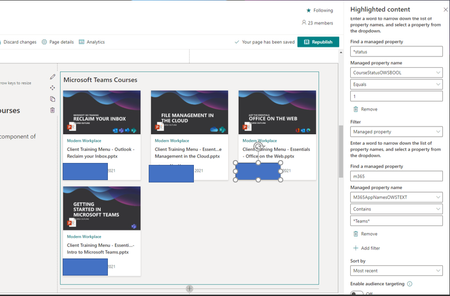
Highlighted Content Web Part - Issues filtering items with Managed Properties
- Apr 20, 2021
Hi atrain204
I've found a recent article on the SharePoint Maven website - https://sharepointmaven.com/crawled-vs-managed-properties-in-sharepoint-online/ that I think might help you.
Upshot of things is that when you have created your custom column, that becomes a crawled property, but you need to map that to a managed property so that you can use with the Highlighted content web part.

Hi atrain204
I've found a recent article on the SharePoint Maven website - https://sharepointmaven.com/crawled-vs-managed-properties-in-sharepoint-online/ that I think might help you.
Upshot of things is that when you have created your custom column, that becomes a crawled property, but you need to map that to a managed property so that you can use with the Highlighted content web part.
- atrain204Apr 20, 2021Steel Contributorthanks! That article was just what I needed.
 Lamis ZOLHOFJul 29, 2021Tin ContributorThank you Jenny, i have a new question : I created a hub with several associated sites. I want to filter certain content from all these sites (documents, pages, news) using highlighted content web part.
Where should i create the custom fields as filters and map theme ? in each site ? in Hub only ? or there is another way to do ?- Jenny BruceJul 29, 2021Iron Contributor
Hi Lamis ZOLHOF
I would recommend that you set up content types in the Content type gallery that you'll find in the Content Services part of SharePoint Admin centre.
In the process of setting up your content types you'll create custom columns that can be used across all your SharePoint site collections.
For more info see Microsoft Docs https://docs.microsoft.com/en-us/sharepoint/create-customize-content-type
The SharePoint Maven site also has a great article with pictures - https://sharepointmaven.com/how-to-make-the-content-types-available-on-all-sharepoint-sites-via-the-content-type-gallery/y
I hope this helps.
