Forum Discussion

mdcastorena
Sep 07, 2021Brass Contributor
Hiding redundant top nav in SPO
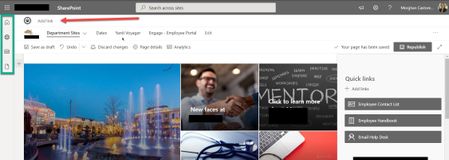
Hi everyone, 3 part question... A.) Can I hide this redundant "top nav" in SPO? Here, I have a house icon which just navigates to our comm site home page, yet the tree icon you see below it does ...

SteveKnutson
Sep 07, 2021MVP
The Add link at the very top is because this site is a Hub and that is the Hub Site Navigation. This will only appear for Site Owners.
To make the navigation appear across all sites - you should use the Hub Navigation and if you don't want the Site navigation (Department Sites...) then remove those menu items.
To make the navigation appear across all sites - you should use the Hub Navigation and if you don't want the Site navigation (Department Sites...) then remove those menu items.

Bob1234566
May 09, 2025Tin Contributor
When logged in as a non-owner user you are correct, the link does not appear. But the navigation bar is still there as an empty bar across the whole screen, so this is not useful.
Navigation in SharePoint Online is an unmitigated mess. For a site associated with a hub, there is no way to customize the hub navigation to meet the needs of the child site, so necessity forces you to keep the site menu, and there is no way to remove the hub menu. So you end up with two navigation bars and there's nothing you can do about it.