Forum Discussion

Hiding redundant top nav in SPO
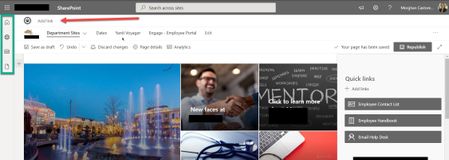

To make the navigation appear across all sites - you should use the Hub Navigation and if you don't want the Site navigation (Department Sites...) then remove those menu items.
 Bob1234566May 09, 2025Tin Contributor
When logged in as a non-owner user you are correct, the link does not appear. But the navigation bar is still there as an empty bar across the whole screen, so this is not useful.
Navigation in SharePoint Online is an unmitigated mess. For a site associated with a hub, there is no way to customize the hub navigation to meet the needs of the child site, so necessity forces you to keep the site menu, and there is no way to remove the hub menu. So you end up with two navigation bars and there's nothing you can do about it.
 mdcastorenaSep 08, 2021Brass Contributor
Hi SteveKnutson - Thank you for your reply. I've made those changes except now how do I get rid of this logo/section here?
- SteveKnutsonSep 08, 2021MVPThe top logo is the Hub Logo and the one you have highlighted is the Site Logo.
There isn't an out of the box way to hide the Site Logo, but you could make it a white image e.g. 1px by 1px white.
The alternative approach is to use CSS but this requires custom SPFx code to load it on every page. https://www.sharepointdiary.com/2020/09/sharepoint-online-inject-custom-css-to-modern-sites.html- mdcastorenaSep 08, 2021Brass Contributor
SteveKnutson That is a good work-around, but then you see this weird unnecessary line break:
What if I removed the Hub site nav and used the Site nav only - would I be able to mimic the Site nav across the other sites?