Forum Discussion

"Get a Link" changed to "Copy Link?" When?
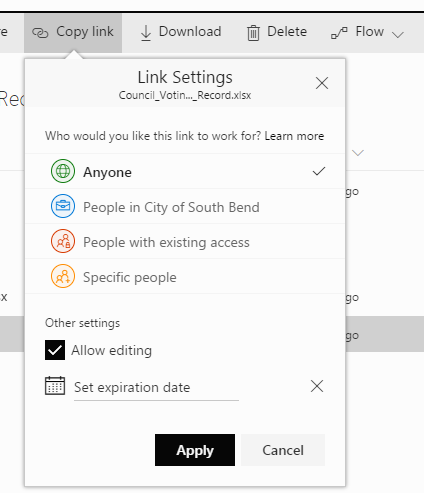
- Jun 27, 2017
Hi Matt Coats,
We changed over to "Copy Link" when we rolled out the new sharing dialog. This has been in-progress for the last two months so your tenant may have seen that changes anytime in that period.
Also, we currently have no feature that allows you to uncheck "Allow editing" by default. Stay tuned though... :)
Stephen Rice
OneDrive Program Manager II

 Microsoft
Andy5, PBeiler1, glad you're enjoying the feature!
Laurie Gonyea, close, but not quite! "Anyone" is equivalent to an anonymous link (i.e. anyone who possesses the link can access the item) and "People in <Company>" is similar. The "Everyone" and "Everyone except external users" claims are special "objects" in the people picker that map to a set of users. Think of them like pre-built security groups.
Thanks!
Stephen Rice
OneDrive Program Manager II

After a few days of playing and getting user feedback, there are some parts of the changes that are confusing for me and our users.
In this scenario I want to share a file with someone, we have disabled anonymous access on our tenant so the user needs to give them direct access to the file, unfortunately our users might not know this or care, they just want to share a file as quick or quicker than it takes to attach a file in an email.
I select the file in my library and I click share from the ribbon, it says "Only you can access this item." to which I say to myself - I know this, but I'm going to share it so that's ok, no problem.
I then type in the person's email address that I want to share it with because I clicked share so obviously whoever I type in here it's going to share with right?
It then says "The recipient you entered doesn't have permission to access the item" and I'm now confused, it doesn't tell me that I need to explicitly give this person permissions and it doesn't automatically give this person permissions either.
From here I'm looking for a button or a something that tells me where to go from here, is there something that allows me to share it with the user or to give this user permissions to access it perhaps?
There isn't one, so I might give up here and people have started to do so. If I don't give up I start clicking around. I click on the yellow icon which takes me to a new set of options. Which defaults to the yellow icon again. In my mind, I've already tried the yellow icon, so I don't try that one. I start clicking around, realise there are no other options (we've disabled anonymous access). So I click back to the yellow icon, enter the email address of the user I want to share the file with. Make sure Allow editing is selected and click apply. Great, now my link has been shared right? Well, not quite yet, actually now I need to click send and finally, it tells me the link has been sent.
Assuming I know exactly what I'm doing it takes seven clicks to send a file to someone who hasn't yet been given direct permissions to the file.
We're finding users have given up way before the final few steps and have just gone back to Dropbox or something else.
I appreciate allowing anonymous access links would perhaps make this easier, but we have disabled these for a reason.
Is there anything we can do to make this process smoother, without having to train 5,000 staff? We're a bit stumped.
 DeletedJul 26, 2017We're seeing exactly the same - it's seems a really strange design decision to give someone the option to "Enter a name of email address" + "Add a message (optional)" + Send button, but for this view to all be about essentially checking whether a user has permission already.
To be completely honest, I'm starting to lose patience with the number of changes being made to the sharing files and folders features in OneDrive & SharePoint. The changes are causing mass confusion across the organisation, and we're seeing users simply give up or flick to competing products & services which are just easier to use.- Andy5Jul 26, 2017Steel ContributorI'm with you on that one Tom. We're struggling with all the changes as well.
We've changed the default to "Only people in *Organisation* with the link can view and edit." which I'm hoping will alleviate some of the concerns.
Additionally, we're rethinking where we should be sharing from in the first place. People are used to sending emails with attachments, so with that in mind, we're starting to recommend people use Outlook and the attach file functionality instead of sharing directly through SharePoint/OneDrive.- StephenRiceJul 31, 2017
Hi Andy5 and Deleted,
Apologies for the slow response, I've been out on vacation for the past few weeks and am now working on catching up with everything. We actually have one team that works on sharing for both OneDrive and SharePoint (as we're actually one team) so your feedback is going to the right place. To make sure I have the right feedback:
1) When clicking share (and having the default set to "specific people"), users are seeing the link that "only works for them" and are making the assumption that when they add a new name, they'll be added to the link. They enter the target user's name and get an error message. At this point, they're stuck as they don't know where to go to fix this.
2) Even when the user does click on the link options, they now believe that the "specific people" option won't work for them so they are still stuck.
3) And if the user makes it through (1) and (2), they don't understand that they need to click "send" to actually complete the share.
4) When owner approval is required for sharing, the sharing dialog doesn't tell the user that there is an additional workflow required.
Does this look about right?
Our goal with the new sharing dialog is to create one of the best sharing experiences we possibly can. This is the first step we are taking to make this happen but it in no way represents the end. Thanks!
Stephen Rice
OneDrive Program Manager II
- Tom BramanJul 12, 2017Brass Contributor
Andy5: Great post. I'm a baffled Site Collection Administrator/Site Owner as well. I can't explain to my end users the meaning of "The recipient you entered doesn't have permission to access the item." Nor am I able to tell them what to do. My only recourse, once again, is to revert back to Classic View, where the sharing UI--while not perfect--is at least production-ready. Maybe StephenRice, or somebody more closely aligned with the SharePoint Product Group (rather than OneDrive), can clarify your excellent questions...
- Andy5Jul 12, 2017Steel ContributorPleased I'm not the only one. Hopefully, Microsoft will listen to our feedback.
I've found another frustrating thing within the new sharing capabilities that occurs if I have disabled the ability for my site members to share files without approval. (Set under Access Request Settings option).
The scenario is: as a user I try sharing a file to someone who doesn't have access to the file. As a user, I may or may not know that I need approval to share something.
I select the file in my library, and I click share from the ribbon.
I then type in the person's email address that I want to share with.
It then says "The recipient you entered doesn't have permission to access the item". I'm already confused as explained in my previous long post on this thread.
I click on the yellow icon which takes me to a new set of options, as mentioned above this is unintuitive, but none the less I have managed to work out where to go to next. I enter the email address or name of the user I want to share the file with. Make sure Allow editing is selected and click apply. Great, now my link has been shared right?
Well, no, now it takes me back to the view I was initially looking at. It tells me again "The recipient you entered doesn't have permission to access the item". and I'm back to square one? Did it work? What's happened here?
I see nothing new, and I give up. Assuming I didn't give up way before this.
What I should see is something along the lines of: "An email has been sent to *Insert name of access requests owner* for approval. After the owner approves the request, recipients will receive a confirmation email."
What has actually happened is an email has been set to me and the person listed to receive access requests.
The email to me (the user trying to share the file) explains that "We've asked the owner to share *Insert site here* with: Joe Bloggs. After the owner approves the request, recipients will receive a confirmation email.". Fair enough.
The email to the access requests owner asks them to approve. Great.
The email works fine, but tell me what's happening within the sharing options as well, don't expect me to read an email to know what has just happened.
