Forum Discussion

Generate autotext + number in column in SP list

Jonas_Daragas you can't do this SharePoint; a calculated column can't loop through all the items in the InternID column to get the max value unlike Excel, it only works across the current item. But you can build a simple flow in Power Automate to achieve this. Create it from blank, there won't be a template for this.
1. The trigger is the SharePoint when a new item is created. Select your site and your list. Next add an initialize variable action, give it a name and make the type Float. Leave the value empty.
2. Next we want to get the maximum value of the InternID column. So add a SharePoint get items action. Select your site and list. That will add your columns to the action. When it has done so click the Show advanced options at the bottom of the flow. In the filter query field type InternID ne '' and inside the single quotes, from the dynamic content box click the Expression tab and type null then click OK. Click in the Order By field and type InternID desc and in the Top Count field type 1
Even though we are only bringing back 1 item add an apply to each action and select value from the dynamic content box.
Next, add a Set variable action, select the variable name and in the value field select InternID from the get items section of the dynamic content box.
Next, add an increment variable action, select the variable and in the value field type 1.
Finally, add a SharePoint update item action. Select the Site and List, and from the dynamic content box select ID and Title from the create item section of the dynamic content box. Click in the InternID field and select the variable.
In this example the previous maximum value was 76 but after adding the Mauritius item the flow triggered and gave it the InternID of 77.
You'd never have got that solution with ChatGPT!
Rob
Los Gallardos
Microsoft Power Automate Community Super User

Hey RobElliott
Thanks already for getting me started. I keep getting an error with the action Get Items (see screenshot). It shows that the expression 'InternID ne' is not valid. Any toughts on this?
Also it is unclear to me will this generate the letters BTARM in this Power Automate? Like BTARM1, BTARM2, BTARM3 etc.
Thank you
- RobElliottFeb 07, 2023Silver ContributorCheck the filter query has a single both before and after the null expression, from your screenshot there on'y appears to be 1 single quote.
I'd forgotten you wanted the letters as well,. This flow doesn't do that, it just increments the maximum value. I'll re-read your post and give you a solution as soon as possible.- Jonas_DaragasFeb 07, 2023Copper Contributor
Thanks alot RobElliott for taking the time to help me out.
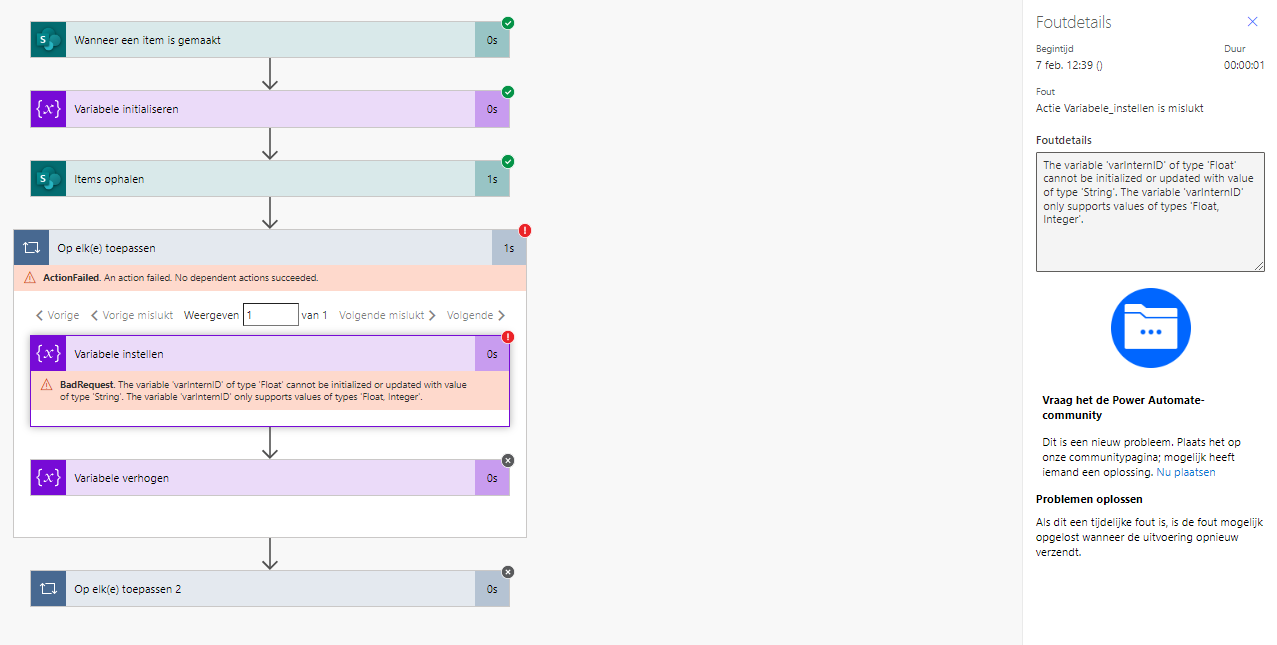
You were indeed right about the ' missing. However another error just surfaced. Don't know if it has something to do with the column already having some rows numbered as BTARM1, BTARM2, etc.